
接口错误与 CORS 排查
接口请求失败时,页面可能只显示“加载失败”,Console 可能出现 Failed to fetch,Network 里也可能看到 404、422 或 500。这些现象对应不同问题,处理方式也不同。
本节使用课程测试 API 和静态页面稳定复现 HTTP 错误、字段校验错误、响应解析错误、网络错误和 CORS 错误,再建立一套固定排查顺序。
本节课解决七个问题:
- 为什么
fetch()收到 404 或 500 时不会自动进入catch。 - 怎样从
{ detail }中读取接口错误信息。 - 怎样处理 FastAPI 常见的 422 字段错误数组。
- 为什么收到
200后仍可能解析失败。 - HTTP 错误与网络错误有什么区别。
- CORS 为什么只能由服务端允许,前端应该检查什么。
- 怎样配合 Console 和 Network 定位请求失败原因。
本节只讲浏览器端识别和排查,不讲 FastAPI 的异常处理与 CORS 中间件配置。
本节按“404 最小实验 → 请求失败分类 → 解析 HTTP 错误 → 区分网络与 CORS → 固定排查顺序”的方式推进。
HTTP 404 最小实验
先让页面请求一个不存在的学员。在课程目录打开两个终端,分别启动测试 API 和静态页面服务:
cd .code/api_server
uv run uvicorn app:app --port 8000python -m http.server 5500第二条命令要在课程目录执行。浏览器打开 HTTP 错误实验(源码文件:./.code/p04/c11-error-cors/01-http-error.html),或直接访问:
http://127.0.0.1:5500/.code/p04/c11-error-cors/01-http-error.html先点“请求正常学员”,再点“请求不存在学员”。第二次操作中,页面显示“请求失败:学员不存在”;Console 输出状态 404 和 response.ok: false;Network 里对应请求的状态也是 404,Response 中有 detail。这说明服务器已经回复了浏览器,下一步要检查 HTTP 响应,而不是排查 CORS。
请求失败分类
先判断问题发生在哪一层:
| 层次 | 常见现象 | 处理方向 |
|---|---|---|
| JavaScript 或响应解析错误 | Console 出现 ReferenceError,或已收到 200 后解析 JSON 失败 | 检查前端代码和响应格式 |
| 网络或浏览器拦截 | fetch 进入 catch,没有可用状态码 | 检查地址、服务、网络和 CORS |
| HTTP 错误 | 收到 400、404、422、500 | 检查 response.ok 和错误响应 |
| 业务结果不符合预期 | 状态码成功,但 items 为空或字段不正确 | 检查参数、接口契约和业务数据 |
不要看到页面没有数据就直接判断为 CORS。先看 Console,再看 Network。
HTTP 错误处理
状态码与 response.ok
请求一个不存在的学员:
const response = await fetch(
  "http://127.0.0.1:8000/api/students/9999",
);

console.log(response.status); // 404
console.log(response.ok); // false服务器已经返回 HTTP 响应,所以 await fetch() 正常得到 Response。404、422 和 500 不会自动变成 JavaScript 异常。
必须主动检查:
if (!response.ok) {
  throw new Error(`请求失败,状态码:${response.status}`);
}抛出错误后,外层 try...catch 才能统一处理:
try {
  const response = await fetch(url);

  if (!response.ok) {
    throw new Error(`请求失败,状态码:${response.status}`);
  }
} catch (error) {
  console.error(error);
}同样的方法也能检查服务端的 500 响应:
const response = await fetch(
  "http://127.0.0.1:8000/api/test/status/500",
);

console.log(response.status); // 500
console.log(response.ok); // false错误消息读取
课程测试 API 的普通错误使用:
{
  "detail": "学员不存在"
}只显示状态码对用户帮助不大:
请求失败,状态码:404读取 detail 后可以显示更明确的信息:
学员不存在async function getErrorMessage(response) {
const defaultMessage =
`请求失败,状态码:${response.status}`;
try {
const data = await response.json();
if (typeof data.detail === "string") {
return data.detail;
}
if (typeof data.message === "string") {
return data.message;
}
} catch (error) {
console.warn("错误响应不是有效 JSON", error);
}
return defaultMessage;
}使用方式:
const response = await fetch(url);

if (!response.ok) {
  const message = await getErrorMessage(response);
  throw new Error(message);
}getErrorMessage() 自己负责读取错误响应体。调用后不要再次对同一个 Response 调用 json()。
422 字段校验
字段格式不符合接口模型时,FastAPI 常见的 422 响应中,detail 可能是数组:
{
  "detail": [
    {
      "type": "string_pattern_mismatch",
      "loc": ["body", "mobile"],
      "msg": "String should match pattern..."
    }
  ]
}可以把字段位置与消息转换成一行文字:
function formatValidationErrors(detail) {
  return detail
    .map((item) => {
      const field = item.loc?.at(-1) ?? "field";
      return `${field}:${item.msg}`;
    })
    .join(";");
}错误读取函数增加数组判断:
if (Array.isArray(data.detail)) {
  return formatValidationErrors(data.detail);
}前端可以把 mobile 映射成“手机号”等中文名称。当前案例先保留接口字段名,方便在 Network 中核对。
字段提示
p04c06 的客户端校验帮助用户尽早发现问题,服务端仍会独立校验。二者可以使用同一套错误区域:
| 来源 | 转换后的页面数据 | 显示方式 |
|---|---|---|
| 本地手机号检查失败 | { mobile: "请输入正确的 11 位手机号" } | 手机号字段旁提示 |
422 中 loc 为 ["body", "mobile"] | { mobile: item.msg } | 同一个错误区域 |
| 网络失败或无法匹配的字段 | 页面级消息 | 表单上方提示,保留已输入内容 |
接回 p04c06 的表单时,可以复用其中的 fieldConfig、clearErrors() 和 showErrors()。假设已经从 422 响应中读出数组 detail,先把简单的请求体字段错误分组:
function splitValidationErrors(detail) {
  const errors = {};
  const otherMessages = [];

  for (const item of detail) {
    const field = item.loc?.length === 2 && item.loc[0] === "body"
      ? item.loc[1]
      : null;

    if (field && Object.hasOwn(fieldConfig, field)) {
      errors[field] = item.msg;
    } else {
      const location = item.loc?.join(".") ?? "请求";
      otherMessages.push(`${location}:${item.msg ?? "未识别的字段错误"}`);
    }
  }

  return { errors, otherMessages };
}["body", "mobile"] 会产生 errors.mobile;["body", "extra", "code"] 等嵌套位置,以及不在 fieldConfig 中的字段会进入页面级消息。在表单顶部增加页面级消息元素:
<p id="form-message" role="alert"></p>显示时沿用上一章的控件与错误区域:
const formMessage = document.querySelector("#form-message");
const { errors, otherMessages } = splitValidationErrors(detail);

clearErrors();
showErrors(errors);
formMessage.textContent = otherMessages.join(";");

const firstErrorField = Object.keys(errors)[0];
if (firstErrorField) {
  fieldConfig[firstErrorField].input.focus();
}showErrors() 已设置 aria-invalid;输入框原有的 aria-describedby 仍指向字段错误区域。重新提交前可以再次本地校验,但仍要处理服务端返回的结果,不能把“本地通过”当成“保存成功”。
不能直接用未知字段访问 fieldConfig,否则访问 .input 时会产生新的 JavaScript 错误,掩盖原来的 422。
非 JSON 响应
代理服务器或网关发生错误时,响应体可能是普通文字或 HTML。不要假设所有错误都是 JSON。
可以先检查响应内容类型:
const contentType = response.headers.get("content-type") ?? "";

if (contentType.includes("application/json")) {
  const data = await response.json();
  console.log(data);
} else {
  const text = await response.text();
  console.log(text);
}完整案例会保存解析结果,用于同时显示错误消息和原始响应,不会重复读取响应体。
状态码速查
| 状态码 | 常见含义 | 前端处理 |
|---|---|---|
400 | 业务参数不正确 | 显示接口 detail,保留用户输入 |
401 | 身份失效或未登录 | 按项目认证规则提示或进入登录页 |
403 | 已识别身份但没有权限 | 提示没有操作权限 |
404 | 地址或数据不存在 | 检查 URL、ID,必要时刷新列表 |
409 | 数据状态冲突 | 提示刷新数据后重试 |
422 | 字段格式未通过校验 | 显示字段错误,检查 Payload |
429 | 请求过于频繁 | 禁用重复操作,稍后重试 |
500 | 服务端内部错误 | 显示通用提示,保留 Network 信息 |
502、503 | 网关或服务暂不可用 | 提示稍后重试 |
401 和 403 不完全相同。401 通常与身份状态有关,403 表示服务端不允许当前身份执行操作。具体认证流程留到后续项目课程。
网络错误与 CORS
网络错误与浏览器拦截
服务没有启动或端口错误时,fetch() 无法得到 Response:
try {
  await fetch("http://127.0.0.1:8999/api/health");
} catch (error) {
  console.error(error.name);    // 常见为 TypeError
  console.error(error.message); // 常见为 Failed to fetch
}此时没有 response.status。常见原因包括:
- API 服务没有启动。
- 主机、端口或路径前半部分写错。
- 设备离线或连接被代理阻断。
- HTTPS 页面请求 HTTP 资源,被浏览器作为混合内容拦截。
- CORS 检查失败,浏览器不把响应交给 JavaScript。
Failed to fetch 信息比较宽泛,必须结合 Console 和 Network 继续判断。
同源与 CORS
来源由三部分组成:
协议 + 主机 + 端口只要其中一项不同,就是不同来源:
| 页面地址 | API 地址 | 是否同源 |
|---|---|---|
http://127.0.0.1:5500 | http://127.0.0.1:5500 | 是 |
http://127.0.0.1:5500 | http://127.0.0.1:8000 | 否,端口不同 |
http://localhost:5500 | http://127.0.0.1:5500 | 否,主机不同 |
https://example.com | http://example.com | 否,协议不同 |
浏览器同源策略限制网页读取其他来源的数据。CORS 是服务端通过响应头明确允许跨域读取的机制。
当前前端页面运行在 5500 端口,API 运行在 8000 端口,两者跨域。
正常测试 API 会在响应中添加类似信息:
Access-Control-Allow-Origin: *浏览器看到服务端允许当前来源后,才把响应交给页面 JavaScript。
如果响应缺少允许信息:
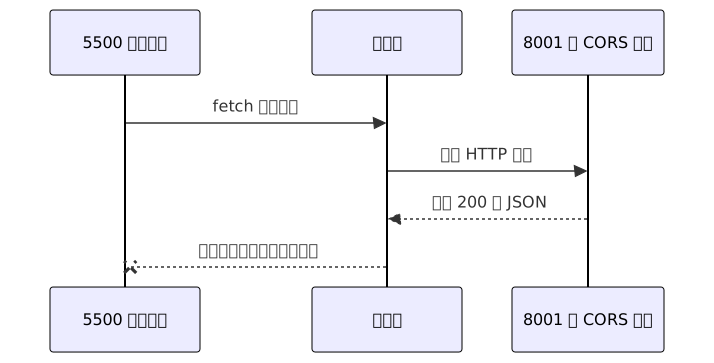
服务端可能已经执行并返回 200,但页面仍然进入 catch。CORS 错误不能只看 JavaScript 的 Failed to fetch,还要看 Console 的跨域提示和 Network 响应头。
OPTIONS 预检
部分跨域请求发送正式请求前,浏览器会先发送 OPTIONS,确认服务端是否允许方法和请求头。这一步叫预检请求。
JSON 写请求常见的预检条件包括:
- 使用 PUT、PATCH、DELETE 等方法。
- 发送
Content-Type: application/json。 - 使用自定义请求头。
Network 中可能先看到:
OPTIONS /api/students预检失败时,正式 POST、PUT 或 DELETE 可能根本不会发送。前端要把页面来源、目标地址、请求方法和请求头提供给后端排查。
CORS 对照实验
正常 API 已允许跨域。为了稳定观察错误,本节在同一个 app.py 中提供一个没有 CORS 响应头的独立测试入口。
第一个终端启动正常 API:
cd .code/api_server
uv run uvicorn app:app --port 8000第二个终端启动无 CORS 演示服务:
cd .code/api_server
uv run uvicorn app:no_cors_app --port 8001第三个终端在课程根目录启动前端:
python -m http.server 5500演示接口:
http://127.0.0.1:8001/api/cors-demo直接在地址栏打开可以看到 JSON,因为地址栏访问不是页面 JavaScript 跨域读取。再从接口错误实验室(源码文件:./.code/p04/c11-error-cors/03-error-lab.html)选择“CORS 错误”,浏览器会阻止页面读取响应。
CORS 常见误区
请求中添加允许来源头
下面的写法无效:
fetch(url, {
  headers: {
    "Access-Control-Allow-Origin": "*",
  },
});Access-Control-Allow-Origin 是服务端响应头,不是前端请求头。
使用 no-cors 模式
const response = await fetch(url, { mode: "no-cors" });这样通常只能得到不可读取内容和状态码的 opaque 响应,不能完成 JSON API 开发。
关闭浏览器安全策略
临时关闭浏览器安全限制会掩盖真实部署问题,也不能帮助普通用户正常访问。
正确做法是:前端确认来源、地址、方法和请求头;服务端按项目规则允许需要的来源、方法和请求头。具体配置留到 FastAPI 课程。
请求排查流程
Console 错误线索
区分三类信息:
- JavaScript 语法或运行错误。
Failed to fetch等网络异常。- 明确包含 CORS、same-origin、blocked 等关键词的浏览器提示。
Network 请求与响应
检查:
- 有没有请求记录。
- Request URL 和 Request Method 是否正确。
- 是否先出现 OPTIONS。
- 状态码是多少。
- Response 或 Preview 是否有错误 JSON。
- Response Headers 是否有允许跨域的响应头。
服务连通性
访问:
http://127.0.0.1:8000/api/health地址栏也打不开时,先处理服务启动或地址问题,不要继续修改前端业务代码。
接口契约
确认方法、路径、参数名、请求体和成功状态码。很多“接口错误”实际是请求没有遵循契约。
综合案例:接口错误实验室
案例需求
通过下拉选项稳定复现:
- 正常
200响应。 400、401、403、404、422和500。- 实际字段校验产生的 422 错误数组。
- 请求当前 HTML 页面,观察状态为 200、但按 JSON 解析失败的情况。
- 连接错误端口产生的网络错误。
- 服务返回 200 但缺少跨域响应头的 CORS 错误。
- 显示请求地址、错误分类、HTTP 状态、耗时和响应内容。
- 无论成功失败,都在
finally中恢复测试按钮。
错误信息解析
async function getErrorInfo(response) {
  const defaultMessage = `请求失败,状态码:${response.status}`;

  try {
    const data = await response.json();

    if (typeof data.detail === "string") {
      return { message: data.detail, data };
    }

    if (Array.isArray(data.detail)) {
      return {
        message: formatValidationErrors(data.detail),
        data,
      };
    }

    if (typeof data.message === "string") {
      return { message: data.message, data };
    }

    return { message: defaultMessage, data };
  } catch (error) {
    console.warn("错误响应无法解析为 JSON", error);
    return { message: defaultMessage, data: null };
  }
}错误分类
let responseStatus = null;
let responseOk = null;

try {
  const response = await fetch(url, options);
  responseStatus = response.status;
  responseOk = response.ok;

  if (!response.ok) {
    const errorInfo = await getErrorInfo(response);
    throw new Error(errorInfo.message);
  }

  await response.json(); // 即使状态是 200,这一步仍可能因响应格式错误而失败。
} catch (error) {
  if (responseStatus === null) {
    showCategory("网络或 CORS 错误");
  } else if (responseOk === false) {
    showCategory("HTTP 错误");
  } else {
    showCategory("响应解析错误");
  }
}CORS 失败时,JavaScript 通常拿不到被拦截响应的状态码,因此仍要到 Network 判断是服务不可达还是跨域限制。若已得到 200 且 response.ok 为 true,随后 response.json() 失败,应检查响应体格式,不能归为 HTTP 错误。
完整代码见:接口错误实验室(源码文件:./.code/p04/c11-error-cors/03-error-lab.html)。
接口错误实验室
<!DOCTYPE html>
<html lang="zh-CN">
<head>
  <meta charset="UTF-8" />
  <meta name="viewport" content="width=device-width, initial-scale=1.0" />
  <title>接口错误与 CORS 排查</title>
  <style>
    * {
      box-sizing: border-box;
    }

    body {
      margin: 0;
      background: #f3f6fa;
      color: #303133;
      font-family: Arial, "Microsoft YaHei", sans-serif;
    }

    button,
    select {
      font: inherit;
    }

    .page-container {
      width: min(980px, calc(100% - 32px));
      margin: 40px auto;
    }

    .page-title {
      margin: 0 0 8px;
      font-size: 28px;
    }

    .page-description {
      margin: 0 0 22px;
      color: #606266;
      line-height: 1.7;
    }

    .panel {
      margin-bottom: 18px;
      padding: 22px;
      border-radius: 10px;
      background: #fff;
      box-shadow: 0 8px 24px rgb(0 0 0 / 5%);
    }

    .control-panel {
      display: grid;
      grid-template-columns: minmax(260px, 1fr) auto;
      align-items: end;
      gap: 14px;
    }

    .form-field {
      display: grid;
      gap: 8px;
    }

    .form-field label {
      color: #606266;
      font-size: 14px;
    }

    .form-field select {
      width: 100%;
      height: 42px;
      padding: 0 12px;
      border: 1px solid #dcdfe6;
      border-radius: 6px;
      background: #fff;
      outline: none;
    }

    .form-field select:focus {
      border-color: #409eff;
      box-shadow: 0 0 0 3px rgb(64 158 255 / 12%);
    }

    .test-button {
      height: 42px;
      min-width: 112px;
      padding: 0 18px;
      border: 0;
      border-radius: 6px;
      background: #409eff;
      color: #fff;
      cursor: pointer;
    }

    .test-button:hover:not(:disabled) {
      background: #66b1ff;
    }

    .test-button:disabled {
      background: #a0cfff;
      cursor: not-allowed;
    }

    .request-box {
      display: grid;
      grid-template-columns: auto minmax(0, 1fr);
      gap: 10px;
      margin-top: 16px;
      padding: 12px 14px;
      border-radius: 6px;
      background: #f8fafc;
      color: #606266;
      font-size: 13px;
      line-height: 1.6;
    }

    .request-url {
      overflow-wrap: anywhere;
      color: #409eff;
    }

    .result-grid {
      display: grid;
      grid-template-columns: repeat(4, minmax(0, 1fr));
      gap: 12px;
      margin-bottom: 18px;
    }

    .result-card {
      padding: 15px;
      border: 1px solid #ebeef5;
      border-radius: 8px;
      background: #fafcff;
    }

    .result-label {
      margin: 0 0 8px;
      color: #909399;
      font-size: 13px;
    }

    .result-value {
      margin: 0;
      overflow-wrap: anywhere;
      font-weight: 600;
      line-height: 1.5;
    }

    .result-value.is-success {
      color: #1b9a59;
    }

    .result-value.is-error {
      color: #d93026;
    }

    .message-box {
      margin-bottom: 16px;
      padding: 14px 16px;
      border-left: 4px solid #409eff;
      border-radius: 5px;
      background: #ecf5ff;
      color: #52606d;
      line-height: 1.7;
    }

    .message-box.is-success {
      border-left-color: #1b9a59;
      background: #e8f8f0;
      color: #137a46;
    }

    .message-box.is-error {
      border-left-color: #d93026;
      background: #fef0f0;
      color: #b42318;
    }

    .response-title {
      margin: 0 0 10px;
      font-size: 16px;
    }

    .response-data {
      min-height: 150px;
      margin: 0;
      padding: 16px;
      overflow: auto;
      border-radius: 7px;
      background: #1f2937;
      color: #e5e7eb;
      font-family: Consolas, Monaco, monospace;
      font-size: 13px;
      line-height: 1.6;
      white-space: pre-wrap;
    }

    .cors-tip {
      margin: 0;
      padding: 14px 16px;
      border-left: 4px solid #d48806;
      border-radius: 5px;
      background: #fff7e6;
      color: #7a5200;
      line-height: 1.7;
    }

    @media (max-width: 760px) {
      .page-container {
        margin: 24px auto;
      }

      .control-panel,
      .result-grid {
        grid-template-columns: 1fr;
      }

      .request-box {
        grid-template-columns: 1fr;
      }
    }
  </style>
</head>
<body>
  <main class="page-container">
    <h1 class="page-title">接口错误实验室</h1>
    <p class="page-description">
      选择一种结果,观察 Response、HTTP 状态、错误 JSON、网络错误和 CORS 错误之间的区别。
    </p>

    <section class="panel">
      <div class="control-panel">
        <div class="form-field">
          <label for="test-type">测试场景</label>
          <select id="test-type">
            <option value="success">正常响应:200</option>
            <option value="400">HTTP 错误:400</option>
            <option value="401">HTTP 错误:401</option>
            <option value="403">HTTP 错误:403</option>
            <option value="404">HTTP 错误:404</option>
            <option value="422">HTTP 错误:422</option>
            <option value="500">HTTP 错误:500</option>
            <option value="validation">真实字段校验:422 数组</option>
            <option value="parse">响应解析错误:200 非 JSON</option>
            <option value="network">网络错误:错误端口</option>
            <option value="cors">CORS 错误:缺少允许响应头</option>
          </select>
        </div>
        <button id="test-button" class="test-button" type="button">
          发送请求
        </button>
      </div>

      <div class="request-box">
        <strong>请求地址</strong>
        <code id="request-url" class="request-url">等待发送请求</code>
      </div>
    </section>

    <section class="panel">
      <div class="result-grid">
        <article class="result-card">
          <p class="result-label">错误分类</p>
          <p id="result-category" class="result-value">未测试</p>
        </article>
        <article class="result-card">
          <p class="result-label">HTTP 状态</p>
          <p id="result-status" class="result-value">—</p>
        </article>
        <article class="result-card">
          <p class="result-label">response.ok</p>
          <p id="result-ok" class="result-value">—</p>
        </article>
        <article class="result-card">
          <p class="result-label">请求耗时</p>
          <p id="result-duration" class="result-value">—</p>
        </article>
      </div>

      <div id="message-box" class="message-box" role="status">
        请选择场景并发送请求。
      </div>

      <h2 class="response-title">响应数据或错误对象</h2>
      <pre id="response-data" class="response-data">等待结果</pre>
    </section>

    <p class="cors-tip">
      CORS 场景需要额外运行 <code>uv run uvicorn app:no_cors_app --port 8001</code>。
      页面只会得到 <code>Failed to fetch</code>,请同时检查 Console 与 Network 中的 8001 请求。
    </p>
  </main>

  <script>
    const API_BASE_URL = "http://127.0.0.1:8000";
    const NO_CORS_URL = "http://127.0.0.1:8001/api/cors-demo";
    const NETWORK_ERROR_URL = "http://127.0.0.1:8999/api/health";

    const testTypeSelect = document.querySelector("#test-type");
    const testButton = document.querySelector("#test-button");
    const requestUrl = document.querySelector("#request-url");
    const resultCategory = document.querySelector("#result-category");
    const resultStatus = document.querySelector("#result-status");
    const resultOk = document.querySelector("#result-ok");
    const resultDuration = document.querySelector("#result-duration");
    const messageBox = document.querySelector("#message-box");
    const responseData = document.querySelector("#response-data");

    function formatValidationErrors(detail) {
      return detail
        .map((item) => {
          const field = item.loc?.at(-1) ?? "field";
          return `${field}:${item.msg}`;
        })
        .join(";");
    }

    async function getErrorInfo(response) {
      const defaultMessage = `请求失败,状态码:${response.status}`;

      try {
        const data = await response.json();

        if (typeof data.detail === "string") {
          return { message: data.detail, data };
        }

        if (Array.isArray(data.detail)) {
          return {
            message: formatValidationErrors(data.detail),
            data,
          };
        }

        if (typeof data.message === "string") {
          return { message: data.message, data };
        }

        return { message: defaultMessage, data };
      } catch (error) {
        console.warn("错误响应无法解析为 JSON", error);
        return { message: defaultMessage, data: null };
      }
    }

    function createTestRequest(testType) {
      if (testType === "parse") {
        // 请求当前 HTML 页面:HTTP 200,但响应体不是 JSON。
        return { url: window.location.href, options: {} };
      }

      if (testType === "success") {
        return {
          url: `${API_BASE_URL}/api/health`,
          options: {},
        };
      }

      if (["400", "401", "403", "404", "422", "500"].includes(testType)) {
        return {
          url: `${API_BASE_URL}/api/test/status/${testType}`,
          options: {},
        };
      }

      if (testType === "validation") {
        return {
          url: `${API_BASE_URL}/api/students`,
          options: {
            method: "POST",
            headers: {
              "Content-Type": "application/json",
            },
            body: JSON.stringify({
              name: "测试学员",
              class_name: "Python 1 班",
              mobile: "123",
              address: "湖南长沙",
              disabled: false,
            }),
          },
        };
      }

      if (testType === "cors") {
        return { url: NO_CORS_URL, options: {} };
      }

      return { url: NETWORK_ERROR_URL, options: {} };
    }

    function setMessage(text, type = "") {
      messageBox.textContent = text;
      messageBox.className = "message-box";

      if (type) {
        messageBox.classList.add(`is-${type}`);
      }
    }

    function setResultValue(element, value, type = "") {
      element.textContent = value;
      element.className = "result-value";

      if (type) {
        element.classList.add(`is-${type}`);
      }
    }

    function showResponseData(data) {
      if (data === null || data === undefined) {
        responseData.textContent = "没有可读取的响应数据";
        return;
      }

      responseData.textContent = JSON.stringify(data, null, 2);
    }

    async function runTest() {
      const testType = testTypeSelect.value;
      const request = createTestRequest(testType);
      const startTime = performance.now();
      let responseStatus = null;
      let responseOk = null;
      let parsedData = null;

      requestUrl.textContent = request.url;
      testButton.disabled = true;
      testTypeSelect.disabled = true;
      testButton.textContent = "请求中...";
      setResultValue(resultCategory, "请求中");
      setResultValue(resultStatus, "—");
      setResultValue(resultOk, "—");
      setResultValue(resultDuration, "—");
      setMessage("正在等待响应...");
      responseData.textContent = "请求进行中";

      try {
        const response = await fetch(request.url, request.options);
        responseStatus = response.status;
        responseOk = response.ok;

        if (!response.ok) {
          const errorInfo = await getErrorInfo(response);
          parsedData = errorInfo.data;
          throw new Error(errorInfo.message);
        }

        parsedData = await response.json();
        setResultValue(resultCategory, "请求成功", "success");
        setMessage(parsedData.message ?? "请求成功", "success");
      } catch (error) {
        console.error(error);

        if (responseStatus === null) {
          setResultValue(resultCategory, "网络或 CORS 错误", "error");
          setMessage(
            "浏览器没有提供可用 Response,请检查 Console 和 Network。",
            "error",
          );
        } else if (responseOk === false) {
          setResultValue(resultCategory, "HTTP 错误", "error");
          setMessage(error.message, "error");
        } else {
          setResultValue(resultCategory, "响应解析错误", "error");
          setMessage(`已收到 HTTP ${responseStatus},但响应解析失败:${error.message}`, "error");
        }

        if (parsedData === null) {
          parsedData = {
            name: error.name,
            message: error.message,
          };
        }
      } finally {
        const duration = Math.round(performance.now() - startTime);
        const statusType = responseOk === false ? "error" : "";

        setResultValue(
          resultStatus,
          responseStatus === null ? "不可用" : String(responseStatus),
          statusType,
        );
        setResultValue(
          resultOk,
          responseOk === null ? "不可用" : String(responseOk),
          statusType,
        );
        setResultValue(resultDuration, `${duration} 毫秒`);
        showResponseData(parsedData);

        testButton.disabled = false;
        testTypeSelect.disabled = false;
        testButton.textContent = "发送请求";
      }
    }

    testButton.addEventListener("click", runTest);
  </script>
</body>
</html>:::
实验验证
保持最小实验的 8000 API 和 5500 静态页面服务运行,浏览器访问:
http://127.0.0.1:5500/.code/p04/c11-error-cors/03-error-lab.html打开开发者工具的 Console 和 Network,在页面中选择场景并点击“发送请求”。
可以按下面步骤验证:
- 先选“正常响应:200”,页面显示“请求成功”,Network 显示 200。
- 选择 404、422 或 500,页面应显示“HTTP 错误”、状态码和接口返回内容;Network 可查看错误响应。
- 选择“真实字段校验”,应看到 422 错误数组与格式化后的字段提示。该实验室只展示错误数据,字段旁提示的接法见前面的 422 示例。
- 选择“响应解析错误:200 非 JSON”,页面显示“响应解析错误”和状态 200;Network 的 Response 是当前 HTML 页面,说明请求成功但响应格式不符合代码预期。
- 选择“网络错误:错误端口”,页面没有可用 HTTP 状态;应同时检查 Console 和 Network。
- 启动 8001 无 CORS 服务后选择 CORS 场景,页面仍显示“网络或 CORS 错误”;Console 会给出跨域提示,Network 可能看到服务返回 200,但 JavaScript 不能读取。
- 每次测试结束后,按钮和下拉框都应恢复可用,说明
finally已执行。
可复制的练习源码
复制后保持导入路径中的目录结构。纯 HTML 页面可直接在浏览器打开;需要 ES Module 或测试 API 的案例,按本节前文的启动命令运行并访问对应路径。
.code/p04/c11-error-cors/01-http-error.html
<!DOCTYPE html>
<html lang="zh-CN">
<head>
  <meta charset="UTF-8" />
  <meta name="viewport" content="width=device-width, initial-scale=1.0" />
  <title>解析 HTTP 错误</title>
  <style>
    body { max-width: 700px; margin: 40px auto; padding: 0 20px; font-family: sans-serif; }
    button { padding: 9px 14px; margin-right: 8px; }
    pre { padding: 16px; background: #18222d; color: #daf4e8; overflow: auto; }
  </style>
</head>
<body>
  <h1>fetch 不会自动抛出 HTTP 错误</h1>
  <button data-id="1" type="button">请求正常学员</button>
  <button data-id="999" type="button">请求不存在学员</button>
  <pre id="result">等待操作</pre>

  <script>
    async function requestStudent(studentId) {
      const response = await fetch(`http://127.0.0.1:8000/api/students/${studentId}`);
      console.log("HTTP 状态:", response.status, "response.ok:", response.ok);
      const data = await response.json();
      if (!response.ok) throw new Error(data.detail ?? `HTTP ${response.status}`);
      return data;
    }

    for (const button of document.querySelectorAll("button[data-id]")) {
      button.addEventListener("click", async () => {
        const result = document.querySelector("#result");
        try {
          const student = await requestStudent(button.dataset.id);
          result.textContent = `请求成功:${student.name}`;
        } catch (error) {
          result.textContent = `请求失败:${error.message}`;
        }
      });
    }
  </script>
</body>
</html>:::
小结
本节课最核心的是掌握八件事:
- HTTP 错误仍会得到 Response,需要主动检查
response.ok。 - 普通错误读取字符串
detail,字段校验错误还要处理数组detail。 - 响应体只能读取一次,错误信息与原始数据应一次解析并保存。
- 状态码为 200 后解析 JSON 失败,属于响应解析问题,不是 HTTP 错误。
- 网络或 CORS 失败通常没有可用状态码。
- CORS 按协议、主机和端口判断来源,由服务端响应头决定是否允许读取。
mode: "no-cors"和前端添加允许来源请求头不能修复 API 跨域。- 排错顺序是 Console → Network → 服务状态 → 接口文档。