
第 8 章:异步数据库与 Redis 缓存
上一章我们已经把学生信息聚合逻辑放进了 FastAPI 接口里。现在接口可以通过:
GET /students/{student_id}/summary对外返回学生基础信息、课程信息和积分信息。
但是当前数据主要还是来自外部 HTTP 服务。真实项目里,接口通常还要访问数据库和 Redis。比如:
- 先从 Redis 缓存里看看有没有学生聚合结果。
- 如果缓存没有,再从数据库中读取学生状态。
- 最后请求外部 HTTP 服务,把所有信息组合后返回。
同一个学生被连续查询时,如果每次都重新查数据库、请求外部服务,就会重复等待;如果为了复用连接却忘记归还,后续请求又可能一直等不到可用连接。本章围绕这两个运行问题,补齐缓存、连接借还和应用关闭的流程。
这就引出本章要解决的 4 个问题:
- 为什么
async def接口里不推荐直接使用同步数据库或同步 Redis 客户端? - 为什么数据库连接池和 Redis 客户端不应该每次请求临时创建?
- 什么是连接池?连接池为什么不能无限大?
- 访问数据库或 Redis 后,为什么要通过
async with或应用生命周期释放资源?
本章只讲项目够用的原则和写法。
不讲数据库系统原理,不讲 SQL 优化,不讲 Redis 高级功能,不讲 ORM 完整 API,也不讲连接池源码。
本章学习目标
学完本章后,我们要能做到:
- 知道异步接口里要优先使用异步数据库客户端和异步 Redis 客户端。
- 能解释同步数据库驱动、同步 Redis 客户端为什么会阻塞事件循环。
- 能解释连接池如何复用连接、限制连接数量,以及借出和归还连接的过程。
- 能理解连接池大小要保守设置,不能无限大。
- 能用
async with表达资源的获取和释放。 - 能在 FastAPI
lifespan中创建和关闭共享资源。 - 能把 Redis 缓存读取、数据库状态读取、外部 HTTP 聚合结果组合进一个接口。
- 能排查连接池创建位置错误、忘记释放资源、忘记
await等常见问题。
缓存与数据库参与的聚合流程
我们继续做“异步学生信息聚合与任务处理系统”。
上一章接口大致是这样:
前端请求 /students/1/summary
        ↓
FastAPI 接口
        ↓
请求学生服务、课程服务、积分服务
        ↓
返回聚合结果现在要接近真实项目一点:
前端请求 /students/1/summary
        ↓
先查 Redis 缓存
        ↓
缓存没有,再查数据库中的学生状态
        ↓
再请求外部 HTTP 服务
        ↓
组合结果,写回缓存
        ↓
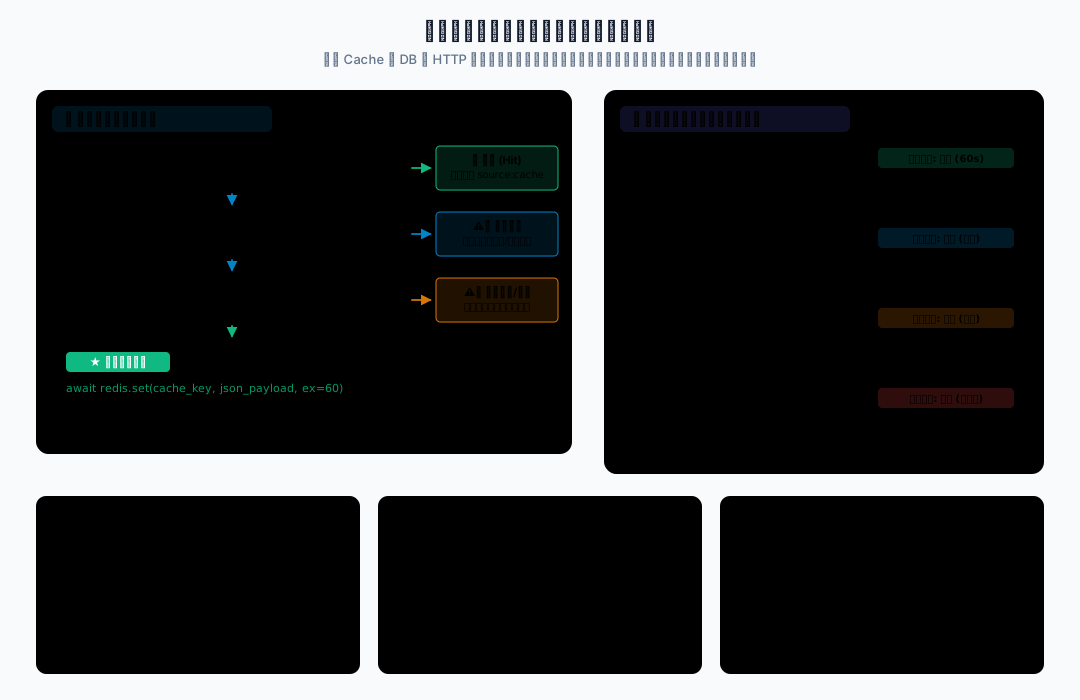
返回聚合结果可以用一个直观的三级聚合架构全景拓扑图表示该流程:
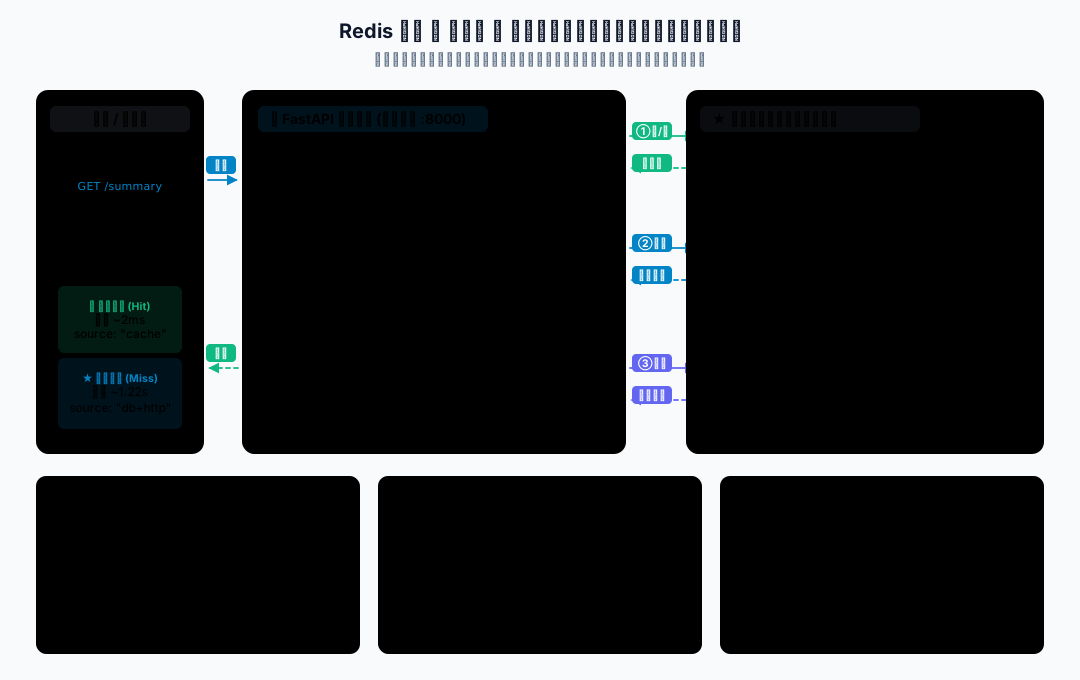
注意:本章的数据库和 Redis 都使用模拟异步对象。这样做是为了让代码不依赖本机数据库和 Redis 服务,学员复制后能直接运行。
真实项目里,模拟数据库池可以替换成 asyncpg、SQLAlchemy Async、aiomysql 等方向;模拟 Redis 可以替换成 redis.asyncio。
异步资源的获取、复用与释放
下面每一步的完整代码都直接显示在页面里。将代码按标注文件名保存到本地 _code_async/c08_async_database_and_redis/,然后在 _code_async 目录执行命令。
1. 数据库连接的获取与释放
同步数据库客户端的阻塞风险
async def 接口适合等待异步 I/O。
如果在里面直接调用同步数据库驱动,例如同步 MySQL 客户端、同步 PostgreSQL 客户端、同步 Redis 客户端,它们在等待网络返回时会卡住当前执行线程。
这和上一章的 time.sleep()、requests.get() 是同一类问题:
代码写在 async def 里,不代表里面所有操作都自动变异步。所以真实异步项目里,推荐使用异步数据库客户端和异步 Redis 客户端。
连接池的作用
数据库连接不是普通变量。
每次新建连接都要经历网络连接、认证、协议握手等过程。频繁创建和关闭连接会浪费时间,也会给数据库造成压力。
连接池管理一组可复用连接,需要时借出,用完后归还。有些池会预先创建部分连接,有些按需创建;关键是复用与数量限制,不是启动时必须建满。
可以先这样理解:
连接池 = 一组可复用的连接 + 最大连接数量限制 + 借出归还机制它主要解决 3 个问题:
- 复用连接,减少频繁创建连接的成本。
- 限制连接数量,避免把数据库压垮。
- 统一管理连接生命周期。
连接池不是越大越好。
如果每个服务实例都开很大的连接池,多个实例加起来可能把数据库最大连接数占满。
连接借还与异常释放
访问数据库时,常见流程是:
获取连接
使用连接查询数据
释放连接如果释放连接这一步忘了,连接就可能一直被占着。连接池里的可用连接越来越少,最后接口就会卡住。
async with 可以把这个流程写得更安全:
async with pool.acquire() as conn:
result = await conn.fetch_student_status(student_id)可以先这样理解:
进入 async with:获取资源
离开 async with:释放资源这里的资源可以是数据库连接、事务、文件句柄、网络连接等。
在连接池场景中,“释放连接”通常是归还给池,后续查询可以再借用;应用关闭时才关闭连接池中的连接。事务的上下文还可能负责提交或回滚,不能把所有 async with 都理解为直接关闭底层连接。
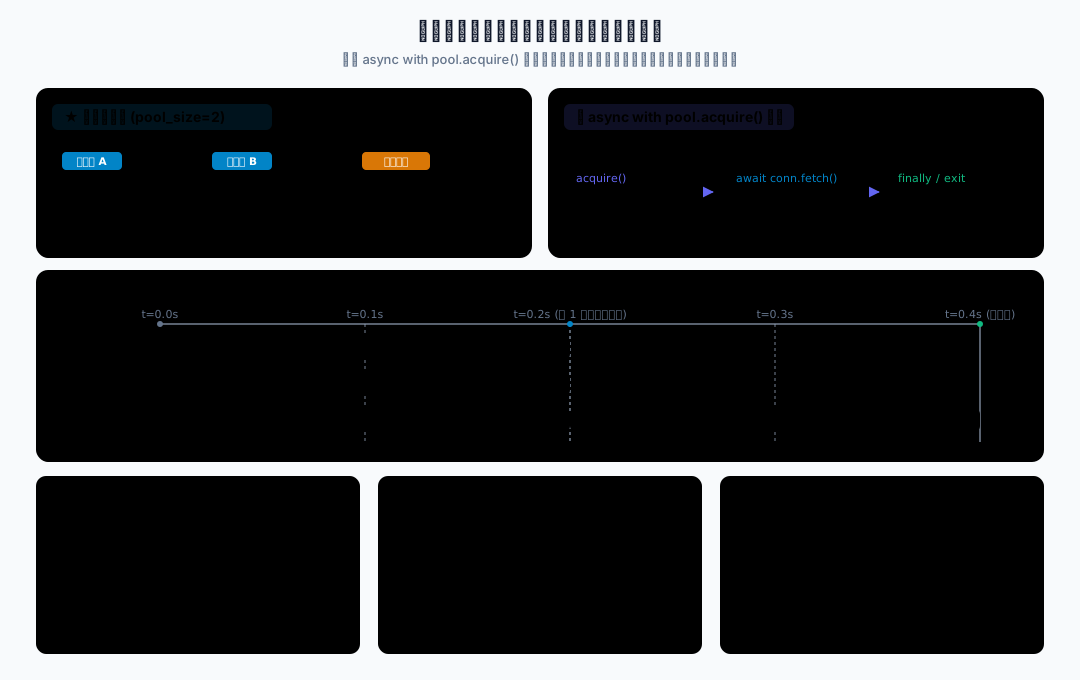
需求:我们先不连接真实数据库,只用一个模拟数据库连接池理解连接的获取和释放。
功能分析:
- 用
FakeAsyncDBPool表示模拟数据库连接池。 - 用
FakeConnection表示模拟数据库连接。 - 用
async with pool.acquire() as conn:表示获取和释放连接。 - 用
asyncio.Semaphore模拟连接池最大连接数量。 - 用
asyncio.gather()同时查询多个学生状态。
文件名:01_async_db_pool.py
import asyncio
import time
from contextlib import asynccontextmanager

student_status_data = {
    1: {"status": "active", "remark": "正常在读"},
    2: {"status": "active", "remark": "正常在读"},
    3: {"status": "frozen", "remark": "账号冻结"},
}


class FakeConnection:
    async def fetch_student_status(self, student_id: int):
        await asyncio.sleep(0.2)
        return student_status_data.get(student_id)


class FakeAsyncDBPool:
    def __init__(self, pool_size: int = 2):
        self._semaphore = asyncio.Semaphore(pool_size)

    @asynccontextmanager
    async def acquire(self):
        await self._semaphore.acquire()
        print("获取数据库连接")
        try:
            yield FakeConnection()
        finally:
            print("释放数据库连接")
            self._semaphore.release()


async def query_status(pool: FakeAsyncDBPool, student_id: int):
    async with pool.acquire() as conn:
        status = await conn.fetch_student_status(student_id)
        return {"student_id": student_id, "status": status}


async def main():
    pool = FakeAsyncDBPool(pool_size=2)
    start_time = time.perf_counter()

    results = await asyncio.gather(
        query_status(pool, 1),
        query_status(pool, 2),
        query_status(pool, 3),
    )

    print(results)
    print(f"总耗时:{time.perf_counter() - start_time:.2f} 秒")


if __name__ == "__main__":
asyncio.run(main())运行命令:
uv run python c08_async_database_and_redis/01_async_db_pool.py运行结果类似:
获取数据库连接
获取数据库连接
释放数据库连接
释放数据库连接
获取数据库连接
释放数据库连接
[
  {'student_id': 1, 'status': {'status': 'active', 'remark': '正常在读'}},
  {'student_id': 2, 'status': {'status': 'active', 'remark': '正常在读'}},
  {'student_id': 3, 'status': {'status': 'frozen', 'remark': '账号冻结'}}
]
总耗时:0.40 秒运行逻辑:
FakeAsyncDBPool(pool_size=2)表示同一时间最多允许 2 个连接被使用。- 3 个查询一起提交,但只有 2 个能先进入连接区。
- 第 3 个查询要等前面的连接释放后,才能继续执行。
async with pool.acquire() as conn:进入时获取连接,退出时释放连接。finally很重要,即使查询中间出错,也能执行释放逻辑。
每次查询模拟等待 0.2 秒。池大小为 2 时,3 个查询分两批完成,总耗时约 0.4 秒;将 pool_size 改为 1 后约 0.6 秒,改为 3 后约 0.2 秒。日志和计时可以一起证明连接名额限制确实生效,实际耗时会有少量调度开销。
注意:FakeAsyncDBPool 是教学模拟,不是真实数据库连接池。真实项目里会使用数据库客户端自己的连接池,不需要自己写这个类。
这个模拟对象只用 Semaphore 表达“最多同时借出几个连接”,没有提前建立真实连接。
本节重点不是“实现连接池”,而是理解:连接要复用,也要释放。
2. 异步缓存与重复查询
Redis 缓存的作用
Redis 常用于缓存热点数据。
例如学生聚合结果第一次查询时,需要查数据库和外部 HTTP 服务。第二次查询同一个学生时,可以直接从 Redis 读缓存,少走很多 I/O。
最小流程是:
先查缓存
命中:直接返回
未命中:查数据库和外部服务
写回缓存
返回结果注意:缓存不是数据库替代品。本章只讲最小缓存流程,不展开缓存穿透、雪崩、击穿、分布式锁等复杂问题。
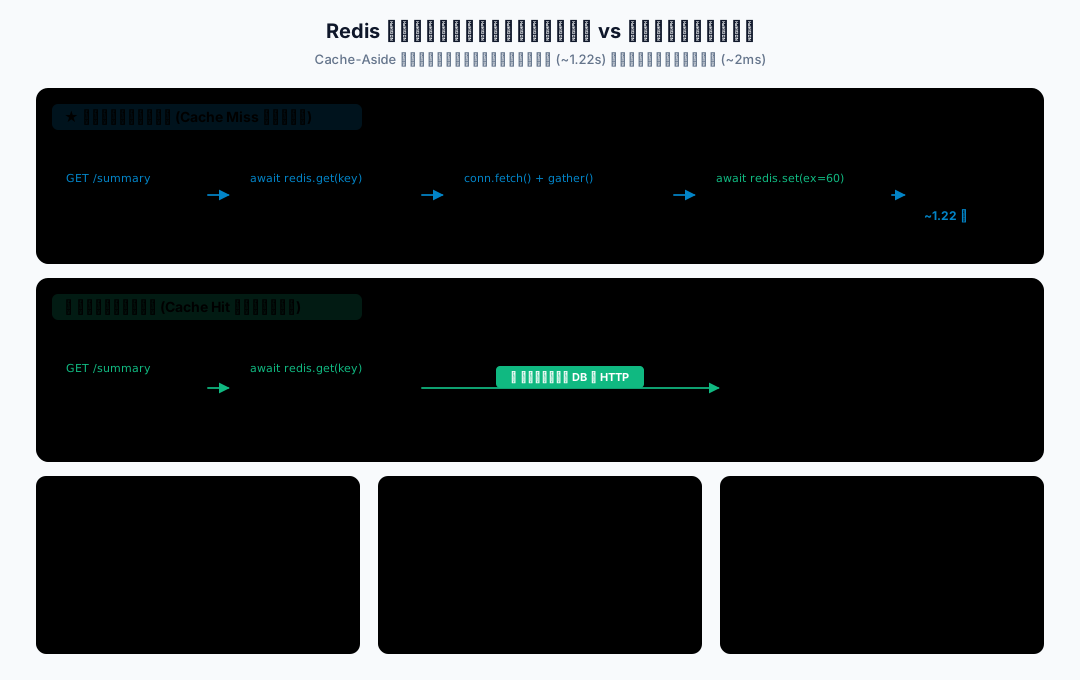
需求:查询学生状态时,先查 Redis 缓存。如果缓存有数据,就不用再查数据库。
功能分析:
- 用
FakeAsyncRedis模拟异步 Redis 客户端。 - 用字典保存缓存数据。
- 第一次查询缓存未命中,走数据库。
- 查询成功后写入缓存。
- 第二次查询同一个学生,直接命中缓存。
文件名:02_async_redis_cache.py
import asyncio

student_status_data = {
    1: {"status": "active", "remark": "正常在读"},
    2: {"status": "active", "remark": "正常在读"},
    3: {"status": "frozen", "remark": "账号冻结"},
}


class FakeAsyncRedis:
    def __init__(self):
        self._data = {}

    async def get(self, key: str):
        await asyncio.sleep(0.05)
        return self._data.get(key)

    async def set(self, key: str, value, expire: int | None = None):
        await asyncio.sleep(0.05)
        self._data[key] = value

    async def aclose(self):
        print("关闭 Redis 客户端")


async def load_student_from_db(student_id: int):
    print(f"查询数据库中的学生 {student_id}")
    await asyncio.sleep(0.2)
    return student_status_data.get(student_id)


async def get_student_status(redis: FakeAsyncRedis, student_id: int):
    cache_key = f"student:{student_id}:status"
    cached = await redis.get(cache_key)

    if cached is not None:
        return {"source": "cache", "data": cached}

    status = await load_student_from_db(student_id)

    if status is None:
        return {"source": "db", "data": None}

    await redis.set(cache_key, status, expire=60)
    return {"source": "db", "data": status}


async def main():
    redis = FakeAsyncRedis()

    try:
        first_result = await get_student_status(redis, 1)
        print("第一次查询:", first_result)

        second_result = await get_student_status(redis, 1)
        print("第二次查询:", second_result)
    finally:
        await redis.aclose()


if __name__ == "__main__":
asyncio.run(main())运行命令:
uv run python c08_async_database_and_redis/02_async_redis_cache.py运行结果类似:
查询数据库中的学生 1
第一次查询: {'source': 'db', 'data': {'status': 'active', 'remark': '正常在读'}}
第二次查询: {'source': 'cache', 'data': {'status': 'active', 'remark': '正常在读'}}
关闭 Redis 客户端运行逻辑:
- 第一次执行
await redis.get(cache_key),缓存里没有数据。 - 程序继续执行
await load_student_from_db(student_id),模拟查数据库。 - 查到数据后执行
await redis.set(...),把结果写入缓存。 - 第二次查询同一个学生时,缓存命中,直接返回。
两次查询只出现一次“查询数据库中的学生 1”,说明第二次绕过了数据库调用。main() 用 try/finally 关闭缓存客户端,查询失败时也会进入清理流程。
注意:await redis.get(...) 和 await redis.set(...) 都表示 I/O 等待。真实 Redis 客户端也要用异步客户端,例如 redis.asyncio。
FakeAsyncRedis.set(..., expire=60) 虽然保留了过期参数,但教学版只是把值写入内存字典,并未实现 60 秒后自动失效。真实缓存需要由 Redis 设置 TTL,并按业务决定何时更新或失效。
TTL(Time To Live)是缓存的存活时间。本章模拟缓存仅在当前进程中有效,重启即清空,也不在多个工作进程之间共享;真实 Redis 是独立服务,可以供多个进程访问。同一学生的多个并发请求也可能同时未命中,各自执行查询;这里只验证顺序请求的缓存复用。
不要在每个请求里临时创建 Redis 客户端。它也应该像 HTTP 客户端一样复用。
3. FastAPI 共享资源的生命周期
应用级资源的创建与关闭
数据库连接池、Redis 客户端、HTTP 客户端都不应该每个请求临时创建。
更常见的做法是:
- 应用启动时创建一次。
- 请求中复用。
- 应用关闭时统一释放。
FastAPI 可以用 lifespan 做这个事情。
yield 前:创建资源
yield:应用处理请求
finally:应用生命周期退出时释放资源app.state 可以保存这些应用级共享对象。
本章只把它当成“保存共享资源的地方”,不展开复杂依赖注入和 ASGI 生命周期原理。
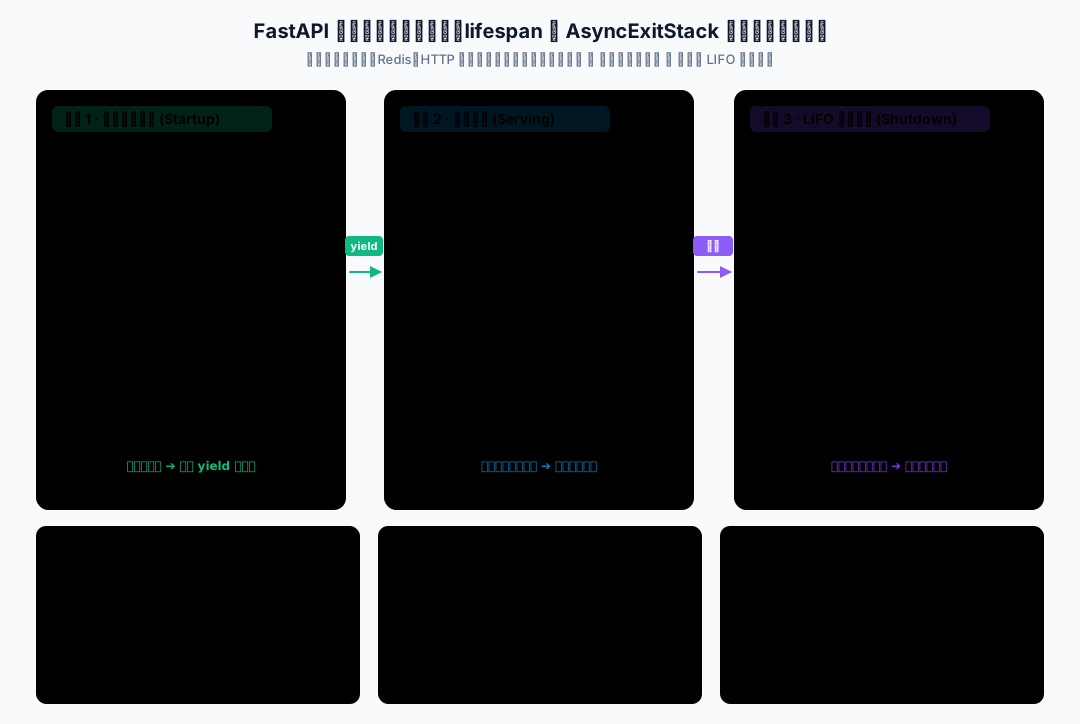
需求:数据库连接池和 Redis 客户端应该在应用启动时创建,在应用关闭时释放。
功能分析:
- 使用 FastAPI
lifespan管理共享资源。 - 用
app.state.db_pool保存数据库池。 - 用
app.state.redis保存 Redis 客户端。 - 服务关闭时调用关闭方法。
- 只演示生命周期,不写复杂业务。
文件名:03_resource_lifespan.py
from contextlib import asynccontextmanager

from fastapi import FastAPI


class FakeAsyncDBPool:
    async def close(self):
        print("关闭数据库连接池")


class FakeAsyncRedis:
    async def aclose(self):
        print("关闭 Redis 客户端")


@asynccontextmanager
async def lifespan(app: FastAPI):
    app.state.db_pool = FakeAsyncDBPool()
    app.state.redis = FakeAsyncRedis()

    print("创建共享资源")
    try:
        yield
    finally:
        print("关闭共享资源")
        try:
            await app.state.redis.aclose()
        finally:
            await app.state.db_pool.close()


app = FastAPI(lifespan=lifespan)


@app.get("/health")
async def health():
return {"status": "ok"}安装依赖:
uv sync启动命令:
uv run python -m uvicorn 03_resource_lifespan:app --reload --app-dir c08_async_database_and_redis访问地址:
http://127.0.0.1:8000/health运行结果说明:
- 服务启动时,控制台会打印“创建共享资源”。
- 访问
/health会返回{"status": "ok"}。 - 服务关闭时,控制台会打印“关闭共享资源”“关闭 Redis 客户端”“关闭数据库连接池”。
运行逻辑:
lifespan的yield前是应用启动阶段。yield后是应用关闭阶段。app.state.db_pool保存数据库池。app.state.redis保存 Redis 客户端。- 请求处理函数可以从
app.state里取共享对象。
完整代码用 try/finally 包住 yield,生命周期上下文异常退出时也会执行清理。关闭 Redis 的操作再由 try/finally 包住,确保即使它关闭失败,数据库池仍会尝试关闭。普通请求报错不会立即结束应用生命周期;不要在每次请求后关闭共享资源。
共享对象以应用进程为单位创建。若启动 4 个工作进程,每个池最多 2 个连接,数据库连接预算就要考虑总共最多 8 个名额,以及其他应用占用;HTTP 并发限制器与数据库连接池也各自限制不同资源。本章使用单个工作进程验证。
注意:数据库连接池、Redis 客户端、HTTP 客户端都适合在应用生命周期里创建和关闭。
不要每个请求都重新创建这些资源。
4. 缓存、数据库与 HTTP 聚合
需求:我们把前面内容组合起来,让学生聚合接口具备 3 个能力:
- 先查 Redis 缓存。
- 缓存未命中时,查数据库中的学生状态。
- 再请求外部 HTTP 服务,组合学生聚合结果,并写回缓存。
项目结构:
_code_async/c08_async_database_and_redis/
├── 01_async_db_pool.py
├── 02_async_redis_cache.py
├── 03_resource_lifespan.py
└── 04_fastapi_storage_summary/
    ├── main.py
└── student_api_server.py安装依赖:
uv sync文件名:main.py
import asyncio
from contextlib import AsyncExitStack, asynccontextmanager

import httpx
from fastapi import FastAPI

BASE_URL = "http://127.0.0.1:8001"

student_status_data = {
    1: {"status": "active", "remark": "正常在读"},
    2: {"status": "active", "remark": "正常在读"},
    3: {"status": "frozen", "remark": "账号冻结"},
}


class FakeConnection:
    async def fetch_student_status(self, student_id: int):
        await asyncio.sleep(0.1)
        return student_status_data.get(student_id)


class FakeAsyncDBPool:
    def __init__(self, pool_size: int = 2):
        self._semaphore = asyncio.Semaphore(pool_size)

    @asynccontextmanager
    async def acquire(self):
        await self._semaphore.acquire()
        try:
            yield FakeConnection()
        finally:
            self._semaphore.release()

    async def close(self):
        print("关闭数据库连接池")


class FakeAsyncRedis:
    def __init__(self):
        self._data = {}

    async def get(self, key: str):
        await asyncio.sleep(0.03)
        return self._data.get(key)

    async def set(self, key: str, value, expire: int | None = None):
        await asyncio.sleep(0.03)
        self._data[key] = value

    async def aclose(self):
        print("关闭 Redis 客户端")


class IncompleteStudentData(Exception):
    """基础信息存在,但外部课程或积分信息缺失。"""


async def fetch_json(
    client: httpx.AsyncClient, url: str, semaphore: asyncio.Semaphore
):
    async with semaphore:
        response = await client.get(url)

    if response.status_code == 404:
        return None

    response.raise_for_status()
    return response.json()


async def fetch_student_profile(
    client: httpx.AsyncClient, student_id: int, semaphore: asyncio.Semaphore
):
    return await fetch_json(client, f"/students/{student_id}/profile", semaphore)


async def fetch_student_courses(
    client: httpx.AsyncClient, student_id: int, semaphore: asyncio.Semaphore
):
    return await fetch_json(client, f"/students/{student_id}/courses", semaphore)


async def fetch_student_points(
    client: httpx.AsyncClient, student_id: int, semaphore: asyncio.Semaphore
):
    return await fetch_json(client, f"/students/{student_id}/points", semaphore)


async def fetch_student_summary_from_http(
    client: httpx.AsyncClient, student_id: int, semaphore: asyncio.Semaphore
):
    results = await asyncio.gather(
        fetch_student_profile(client, student_id, semaphore),
        fetch_student_courses(client, student_id, semaphore),
        fetch_student_points(client, student_id, semaphore),
        return_exceptions=True,
    )
    for result in results:
        if isinstance(result, BaseException):
            raise result
    profile, courses, points = results

    if profile is None:
        return None

    missing = []
    if courses is None:
        missing.append("课程")
    if points is None:
        missing.append("积分")
    if missing:
        raise IncompleteStudentData(f"{'、'.join(missing)}接口返回 404")

    return {
        "profile": profile,
        "courses": courses,
        "points": points,
    }


async def load_student_status_from_db(db_pool: FakeAsyncDBPool, student_id: int):
    print(f"查询数据库中的学生 {student_id}")
    async with db_pool.acquire() as conn:
        return await conn.fetch_student_status(student_id)


async def get_student_summary_with_cache(
    redis: FakeAsyncRedis,
    db_pool: FakeAsyncDBPool,
    client: httpx.AsyncClient,
    semaphore: asyncio.Semaphore,
    student_id: int,
):
    cache_key = f"student:{student_id}:summary"
    cached = await redis.get(cache_key)

    if cached is not None:
        return {
            "student_id": student_id,
            "ok": True,
            "reason": "success",
            "source": "cache",
            "data": cached,
        }

    status = await load_student_status_from_db(db_pool, student_id)
    if status is None:
        return {
            "student_id": student_id,
            "ok": False,
            "reason": "not_found",
            "source": "db",
            "data": None,
        }

    print(f"请求学生 {student_id} 的三个外部 HTTP 接口")
    http_summary = await fetch_student_summary_from_http(client, student_id, semaphore)

    if http_summary is None:
        return {
            "student_id": student_id,
            "ok": False,
            "reason": "not_found",
            "source": "db+http",
            "data": None,
        }

    summary = {
        "status": status,
        "external": http_summary,
    }

    await redis.set(cache_key, summary, expire=60)

    return {
        "student_id": student_id,
        "ok": True,
        "reason": "success",
        "source": "db+http",
        "data": summary,
    }


@asynccontextmanager
async def lifespan(app: FastAPI):
    async with AsyncExitStack() as stack:
        app.state.client = await stack.enter_async_context(
            httpx.AsyncClient(base_url=BASE_URL, timeout=3.0, trust_env=False)
        )
        app.state.db_pool = FakeAsyncDBPool(pool_size=2)
        stack.push_async_callback(app.state.db_pool.close)
        app.state.redis = FakeAsyncRedis()
        stack.push_async_callback(app.state.redis.aclose)
        app.state.semaphore = asyncio.Semaphore(5)

        print("创建 HTTP 客户端、数据库连接池、Redis 客户端")
        try:
            yield
        finally:
            print("关闭 HTTP 客户端、数据库连接池、Redis 客户端")


app = FastAPI(lifespan=lifespan)


@app.get("/health")
async def health():
    return {"status": "ok"}


@app.get("/students/{student_id}/summary")
async def get_student_summary(student_id: int):
    try:
        return await get_student_summary_with_cache(
            app.state.redis,
            app.state.db_pool,
            app.state.client,
            app.state.semaphore,
            student_id,
        )
    except asyncio.CancelledError:
        raise
    except IncompleteStudentData as exc:
        return {
            "student_id": student_id,
            "ok": False,
            "reason": "incomplete_data",
            "data": None,
            "message": str(exc),
        }
    except httpx.TimeoutException as exc:
        return {
            "student_id": student_id,
            "ok": False,
            "reason": "timeout",
            "data": None,
            "message": str(exc),
        }
    except httpx.HTTPError as exc:
        return {
            "student_id": student_id,
            "ok": False,
            "reason": "http_error",
            "data": None,
            "message": str(exc),
        }
    except Exception as exc:
        return {
            "student_id": student_id,
            "ok": False,
            "reason": "error",
            "data": None,
            "message": str(exc),
        }


@app.get("/debug/cache/{student_id}")
async def debug_cache(student_id: int):
    cache_key = f"student:{student_id}:summary"
    cached = await app.state.redis.get(cache_key)

    return {
        "cache_key": cache_key,
        "data": cached,
}配套的学生接口也要保存到同一个案例目录:
import asyncio

from fastapi import FastAPI, HTTPException

app = FastAPI()

student_profiles = {
    1: {"id": 1, "name": "张三", "age": 18},
    2: {"id": 2, "name": "李四", "age": 19},
    3: {"id": 3, "name": "王五", "age": 20},
}

student_courses = {
    1: ["Python 基础", "异步编程"],
    2: ["Web 后端", "数据库入门"],
    3: ["Redis 入门", "FastAPI 实战"],
}

student_points = {
    1: 96,
    2: 88,
    3: 75,
}


def ensure_student_exists(student_id: int):
    if student_id not in student_profiles:
        raise HTTPException(status_code=404, detail="student not found")


@app.get("/students/{student_id}/profile")
async def get_student_profile(student_id: int):
    ensure_student_exists(student_id)
    return student_profiles[student_id]


@app.get("/students/{student_id}/courses")
async def get_student_courses(student_id: int):
    ensure_student_exists(student_id)
    return {"courses": student_courses.get(student_id, [])}


@app.get("/students/{student_id}/points")
async def get_student_points(student_id: int):
    ensure_student_exists(student_id)

    if student_id == 3:
        await asyncio.sleep(2)

return {"points": student_points.get(student_id, 0)}启动命令需要两个终端,均从本地 _code_async 目录开始。先停止前面的演示服务,释放 8000 和 8001 端口;先启动学生服务,再访问聚合服务。
终端 A,启动学生服务:
uv run python -m uvicorn student_api_server:app --port 8001 --app-dir c08_async_database_and_redis/04_fastapi_storage_summary终端 B,启动聚合服务:
uv run python -m uvicorn main:app --port 8000 --app-dir c08_async_database_and_redis/04_fastapi_storage_summary访问路径:
http://127.0.0.1:8000/health
http://127.0.0.1:8000/students/1/summary
http://127.0.0.1:8000/debug/cache/1运行结果说明:
第一次访问:
GET /students/1/summary可能返回:
{
  "student_id": 1,
  "ok": true,
  "reason": "success",
  "source": "db+http",
  "data": {
    "status": {
      "status": "active",
      "remark": "正常在读"
    },
    "external": {
      "profile": {
        "id": 1,
        "name": "张三",
        "age": 18
      },
      "courses": {
        "courses": ["Python 基础", "异步编程"]
      },
      "points": {
        "points": 96
      }
    }
  }
}这说明第一次没有命中缓存,程序走了数据库和外部 HTTP 聚合。
第二次访问同一个地址,可能返回:
{
  "student_id": 1,
  "ok": true,
  "reason": "success",
  "source": "cache",
  "data": {
    "status": {
      "status": "active",
      "remark": "正常在读"
    },
    "external": {
      "profile": {
        "id": 1,
        "name": "张三",
        "age": 18
      },
      "courses": {
        "courses": ["Python 基础", "异步编程"]
      },
      "points": {
        "points": 96
      }
    }
  }
}这说明第二次命中了缓存。
external 延续第 7 章的原响应对象结构:课程列表在 external.courses.courses,积分值在 external.points.points。首次查询会打印一次数据库查询和一次“三个外部 HTTP 接口”提示;第二次命中缓存后不再出现这两条提示。source 与日志一起验证缓存确实绕过了后续 I/O。
访问缓存调试接口:
GET /debug/cache/1可以看到缓存里的学生聚合结果。
验收时核对 cache_key 为 student:1:summary,data 中包含学生状态与外部信息。同一个聚合服务进程内,首次请求返回 source: "db+http",第二次请求应返回 source: "cache";重启服务后,模拟内存缓存会清空。
关键流程可参见前文的 三级异步聚合架构全景拓扑图。
关键代码解释:
app.state.db_pool保存模拟数据库连接池。app.state.redis保存模拟 Redis 客户端。app.state.client保存共享httpx.AsyncClient。app.state.semaphore限制同时发出的 HTTP 请求数为 5。lifespan在服务启动时创建这些资源。lifespan在服务关闭时释放这些资源。get_student_summary_with_cache()是本章主业务流程。load_student_status_from_db()用async with db_pool.acquire()获取和释放连接。redis.get()命中时,接口直接返回缓存结果。- 缓存未命中时,才查数据库和外部 HTTP 服务。
- 仅在数据库状态、基础信息、课程和积分均查询成功后执行
redis.set()写回缓存。
数据库连接只在读取状态时占用,查询结束立即归还;等待外部 HTTP 服务时不再占用数据库名额。状态为 frozen 的学生仍可查询,本章只展示状态字段,不实现账号访问控制。
综合案例用 AsyncExitStack 管理多种资源:每创建一个资源,就登记它的退出或关闭操作。退出时按登记的逆序关闭 Redis、数据库池和 HTTP 客户端;即使启动中途失败、生命周期异常退出,或某个关闭操作报错,其余已登记资源仍会尝试清理。它解决的是多资源释放顺序,本章不展开上下文管理器的实现。
失败结果与缓存条件
| 场景 | reason | 后续处理 |
|---|---|---|
| 数据库查不到学生状态 | not_found | 提前返回,source 为 db,不请求外部服务 |
| 外部基础信息返回 404 | not_found | 不写缓存,source 为 db+http |
| 基础信息存在,但课程或积分返回 404 | incomplete_data | message 指明缺失接口,不写缓存 |
| 外部 HTTP 请求超时 | timeout | 不写缓存 |
| 其他 HTTP 错误 | http_error | 不写缓存 |
| 数据库、缓存等其他操作异常 | error | 返回失败结果,本例不做缓存故障降级 |
失败结果均包含 ok=false 和 data=null;取消请求继续向外传播。课程接口成功返回空列表仍是完整结果,不应误判为缺失。这里沿用教学案例的 HTTP 200 响应,业务结果由 ok 和 reason 表示。
验收缺失数据时,先重启聚合服务清空模拟缓存,再将 fetch_student_courses() 的路径临时改为 /students/{student_id}/courses_missing,重启后请求学生 1,应得到 incomplete_data;随后访问 /debug/cache/1,data 应为 null。恢复路径并重启,才能继续正常缓存实验。否则已有缓存会遮住故障路径。
真实项目映射:
FakeAsyncDBPool可以替换成asyncpg连接池、SQLAlchemy Async Engine、aiomysql连接池等。FakeAsyncRedis可以替换成redis.asyncio.Redis。- 第 6 章的本地学生服务可以替换成真实服务 URL。
app.state可以继续使用,也可以在后续项目中结合依赖注入做得更规范。
这里的“替换”需要调整客户端 API。模拟缓存直接保存 Python 字典,真实 Redis 的本例应先编码为 JSON 字符串,读取后再解码;模拟参数 expire=60 对应真实 Redis 的 ex=60。客户端复用、连接获取和关闭方式也应按所选库调整。
注意:本章完整案例是教学版,不是生产级项目模板。
选学:真实异步客户端的连接与关闭
主线案例继续使用模拟对象,便于不安装数据库服务就能运行。下面两个独立代码块展示真实客户端的连接、查询和关闭方式,不需要修改本章的完整案例。
主线示例只需前文的 uv sync。下面的两个选学代码块还需要额外依赖;若要复制运行,在本地 _code_async 目录安装:
uv add aiosqlite redisaiosqlite 可以用内存 SQLite 直接体验异步查询;这个简例没有连接池:
import asyncio

import aiosqlite


async def main():
    async with aiosqlite.connect(":memory:") as db:
        await db.execute("CREATE TABLE student_status (id INTEGER, status TEXT)")
        await db.execute(
            "INSERT INTO student_status VALUES (?, ?)", (1, "active")
        )
        await db.commit()

        async with db.execute(
                "SELECT status FROM student_status WHERE id = ?", (1,)
        ) as cursor:
            row = await cursor.fetchone()
        print(row[0] if row else None)


asyncio.run(main())下面的 Redis 代码需要本机 127.0.0.1:6379 已启动 Redis 服务。客户端在应用中应复用,关闭时显式调用 aclose():
import asyncio
import json

import redis.asyncio as redis


async def main():
    client = redis.Redis(host="127.0.0.1", port=6379, decode_responses=True)
    try:
        status = {"status": "active", "remark": "正常在读"}
        await client.set(
            "student:1:status", json.dumps(status, ensure_ascii=False), ex=60
        )
        cached = await client.get("student:1:status")
        print(json.loads(cached) if cached is not None else None)
    finally:
        await client.aclose()


asyncio.run(main())真实项目里的连接配置、表结构和缓存键要按项目调整;这里只对照模拟对象中的 await、资源复用和释放。
decode_responses=True 让客户端返回字符串,JSON 解码再还原为字典;它本身不会自动还原 JSON 对象。此例由客户端管理内部连接池,aclose() 同时关闭该池;若多个客户端显式共用外部连接池,应另行管理池的关闭。参见 redis-py 异步客户端示例。
本章小结
本章我们把异步能力扩展到了数据库和 Redis 场景。
最核心的是 4 件事:
- 异步接口里不要直接调用同步数据库和同步 Redis 客户端。
- 数据库连接池和 Redis 客户端要复用,不要每个请求临时创建。
- 用
async with表达资源获取和释放,避免连接被长期占用。 - 用
lifespan创建和关闭应用级共享资源。
完整案例中,我们实现了:
先查 Redis 缓存
缓存未命中再查数据库
再请求外部 HTTP 服务
组合结果后写回缓存
最后返回接口响应本章的模拟数据库和 Redis 是为了让代码可运行。真实项目中要替换成异步数据库客户端和异步 Redis 客户端。
练习
练习 1:在同一个聚合服务进程中,连续两次访问 /students/1/summary。检查第一次的 source 是否为 db+http,第二次是否为 cache;再访问 /debug/cache/1 核对缓存键与数据。
练习 2:在综合案例中将 cached = await redis.get(cache_key) 临时改为 cached = None,重启后连续请求学生 1。两次均应返回 source: "db+http",并各打印一次数据库查询和外部请求提示。恢复缓存读取并重启,重复练习 1。
练习 3:在单工作进程下连续请求两次,核对共享资源创建提示只在启动时出现一次。按 Ctrl+C 停止服务,核对 Redis 和数据库池的关闭提示;检查 HTTP 客户端已由 AsyncExitStack 登记关闭。
练习 4:分别把连接池演示的 pool_size 改为 1、2、3,比较约 0.6、0.4、0.2 秒的耗时。再在同一池中借出连接后主动抛出并捕获 RuntimeError,随后用 async with pool.acquire() 再查询一次;应能继续查询,且日志包含异常前连接的释放提示。实验后恢复原代码。
练习 5:按正文步骤制造课程接口 404,核对 incomplete_data 和空缓存。恢复后查询不存在的学生 404,应返回 not_found, source="db",并且不打印外部 HTTP 请求提示。