
第 9 章:异步队列、生产者与消费者
学生信息查询助手已经可以通过下面接口返回聚合信息:
GET /students/{student_id}/summary到目前为止,接口主流程已经能做几件事:
- 查 Redis 缓存。
- 缓存未命中时查模拟数据库。
- 请求外部 HTTP 服务。
- 返回学生聚合信息。
现在我们想再增加一些“不影响当前响应”的任务:
- 记录访问日志。
- 更新学生访问统计。
- 模拟发送通知。
这些任务不一定要在接口返回前完成。用户最关心的是尽快拿到学生信息。如果把日志、统计、通知都放在接口主流程里等待,接口就会变慢。
本章要解决 4 个问题:
- 为什么有些任务不应该放在接口主流程里等待?
asyncio.Queue如何把“要做的事”先存起来?- 后台消费者如何从队列中取任务并处理?
- 服务关闭时,如何让后台消费者尽量处理完队列里的任务并退出?
本章只讲同一个进程内的异步队列和后台 worker。它适合学习生产者消费者模式,也适合简单的非关键后台任务。
本章不讲 Celery、RabbitMQ、Kafka、Redis Stream,也不讲可靠投递、死信队列、分布式事务和生产级消息队列架构。
本章学习目标
学完本章后,我们要能做到:
- 理解生产者消费者模式的够用含义。
- 知道
asyncio.Queue适合在同一个进程内传递异步任务。 - 能使用
await queue.put(item)把任务放进队列。 - 能使用
await queue.get()从队列中取出任务。 - 能使用
queue.task_done()标记任务处理完成。 - 能使用
await queue.join()等待队列里的任务处理完。 - 能使用
Queue(maxsize=...)做简单背压,避免任务无限堆积。 - 能写一个后台消费者循环处理任务。
- 能在 FastAPI
lifespan中创建队列、启动后台消费者、关闭时发送退出信号。 - 能说清楚内存队列的适用边界和常见坑。
学生接口的后台任务场景
我们先看一个常见接口流程。

这个流程里面的每一步都和当前响应直接相关,所以接口需要等待它们完成。
但是下面这些任务不一样:
记录访问日志
更新访问统计
发送模拟通知它们不影响用户拿到学生信息。我们可以先把这些任务放进队列,然后让后台 worker 慢慢处理。

这就是本章要学习的核心:主流程负责快速响应,后台消费者负责慢任务。
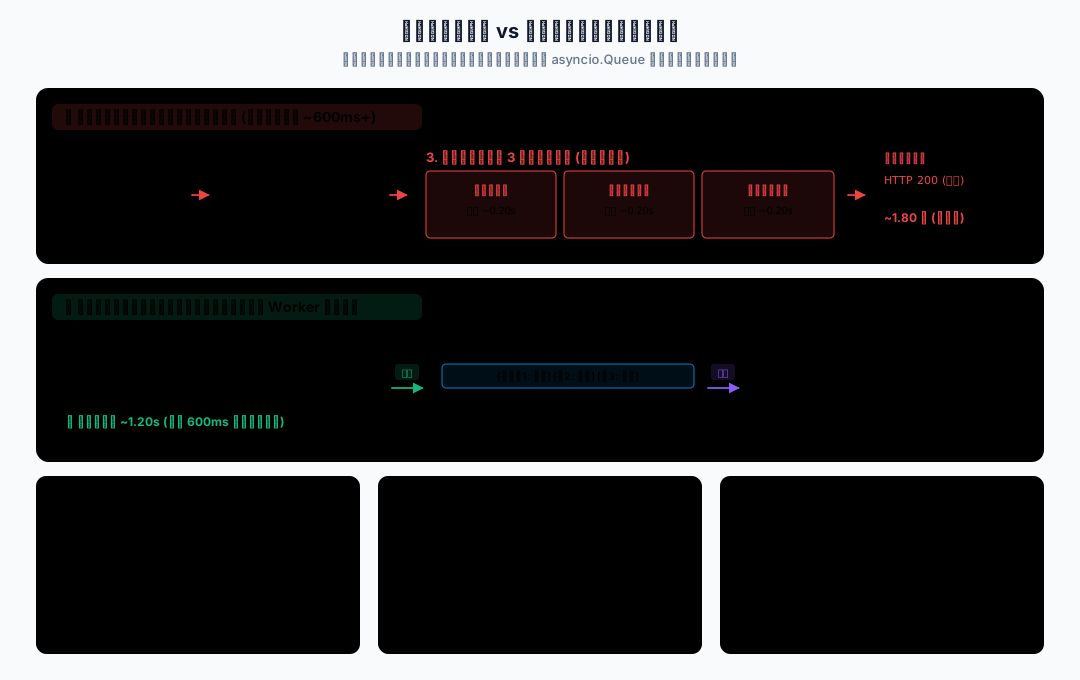
队列处理与消费者生命周期
下面每一步的完整代码都直接显示在页面里。将代码按标注文件名保存到本地 _code_async/c09_async_queue_producer_consumer/,然后在 _code_async 目录执行命令。
1. Queue 中的任务交接
生产者消费者模式
生产者消费者模式可以先简单理解为:
生产者负责放任务。
队列负责暂存任务。
消费者负责取任务并处理。在本章案例里:
- FastAPI 接口是生产者。
asyncio.Queue是队列。- 后台 worker 是消费者。
它解决的问题是:把不需要立即完成的任务,从主请求链路中拆出去。
日常项目中,适合放进后台队列的任务有:
- 访问日志。
- 统计更新。
- 普通通知。
- 非关键埋点。
- 可以延迟处理的小任务。
不适合放进本章内存队列的任务有:
- 必须可靠送达的订单任务。
- 支付、退款、库存扣减这类关键业务。
- 服务重启后不能丢失的任务。
- 多进程、多机器需要共享的任务。
这些要用生产级消息队列或任务系统。本章只讲项目够用的单进程内存队列。
队列操作与任务计数
asyncio.Queue 是 asyncio 提供的异步队列。
它解决的问题是:在异步程序里安全地传递任务数据。
常用写法只有几个:
queue = asyncio.Queue(maxsize=100)
await queue.put(task)
task = await queue.get()
queue.task_done()
await queue.join()先记住它们的职责:
| 写法 | 作用 |
|---|---|
Queue(maxsize=100) | 创建最多积压 100 个任务的队列 |
await queue.put(task) | 把任务放进队列,队列满时会等待 |
await queue.get() | 从队列取任务,队列空时会等待 |
queue.task_done() | 告诉队列:刚才取出的任务处理完了 |
await queue.join() | 等所有已放入队列的任务都处理完 |
注意:queue.join() 等的是“未完成任务数归零”,不是关闭队列。
每次成功 get() 后应恰好调用一次 task_done(),取到退出信号也不例外;多调用会抛出 ValueError。qsize()==0 只说明没有待取任务,消费者可能仍在处理刚取出的任务;join() 返回也不代表消费者已退出,还要等待它的任务对象。maxsize=0 表示不限制容量。
本章队列用于同一事件循环中的协程协作,不是跨线程安全队列。参见 Python 3.14 队列文档。
task_done() 表示这一项已经结束处理,不表示业务一定成功。worker 捕获任务异常后也要调用它;是否成功要看处理结果或错误记录,不能只看 join() 是否返回。
退出信号
后台 worker 通常会写成一个循环:
while True:
    task = await queue.get()
...如果没有退出机制,worker 会一直等在 queue.get()。
本章使用 None 作为退出信号:
await queue.put(None)worker 取到 None 后退出。
这只是教学里的简单写法。真实项目可以使用更清晰的结构,例如:
{"type": "shutdown"}Python 3.14 也可以使用 queue.shutdown() 停止接收新任务,并让消费者在队列排空后收到 QueueShutDown。本章继续用 None 演示退出信号,便于先看懂生产者和消费者如何配合。
需求:不用 FastAPI,先用一个普通 Python 脚本理解队列的基本流程。
功能分析:
producer()放入 3 个学生访问日志任务。consumer()从队列中取出任务并处理。- 使用
None作为退出信号。 - 使用
task_done()标记任务完成。 - 使用
queue.join()等待任务全部处理完。
文件名:01_queue_basic.py
import asyncio


async def producer(queue: asyncio.Queue):
    for student_id in [1, 2, 3]:
        task = {"type": "access_log", "student_id": student_id}
        await queue.put(task)
        print("放入任务", task)

    await queue.put(None)


async def consumer(queue: asyncio.Queue):
    while True:
        task = await queue.get()

        try:
            if task is None:
                print("收到退出信号")
                return

            print("处理任务", task)
            await asyncio.sleep(0.2)
        finally:
            queue.task_done()


async def main():
    queue = asyncio.Queue()
    consumer_task = asyncio.create_task(consumer(queue))

    await producer(queue)
    await queue.join()
    await consumer_task


if __name__ == "__main__":
asyncio.run(main())运行命令:
uv run python c09_async_queue_producer_consumer/01_queue_basic.py可能看到类似输出:
放入任务 {'type': 'access_log', 'student_id': 1}
放入任务 {'type': 'access_log', 'student_id': 2}
放入任务 {'type': 'access_log', 'student_id': 3}
处理任务 {'type': 'access_log', 'student_id': 1}
处理任务 {'type': 'access_log', 'student_id': 2}
处理任务 {'type': 'access_log', 'student_id': 3}
收到退出信号运行逻辑:
main()创建队列。asyncio.create_task(consumer(queue))启动消费者。producer()把 3 个任务和 1 个退出信号放进队列。- 消费者循环执行
await queue.get()。 - 每处理一个任务,都会执行
queue.task_done()。 await queue.join()会等待所有任务都调用过task_done()。- 消费者收到
None后退出。
注意:task_done() 要放在 finally 里。这样即使任务处理出错,也能告诉队列“这个任务已经处理结束”。否则 queue.join() 可能一直等。
这个最小示例只演示正常流程,尚未捕获任务处理异常。finally 能维护计数,但不能阻止消费者因异常退出;后续未处理项仍可能让 join() 等待。下一节补上异常处理。
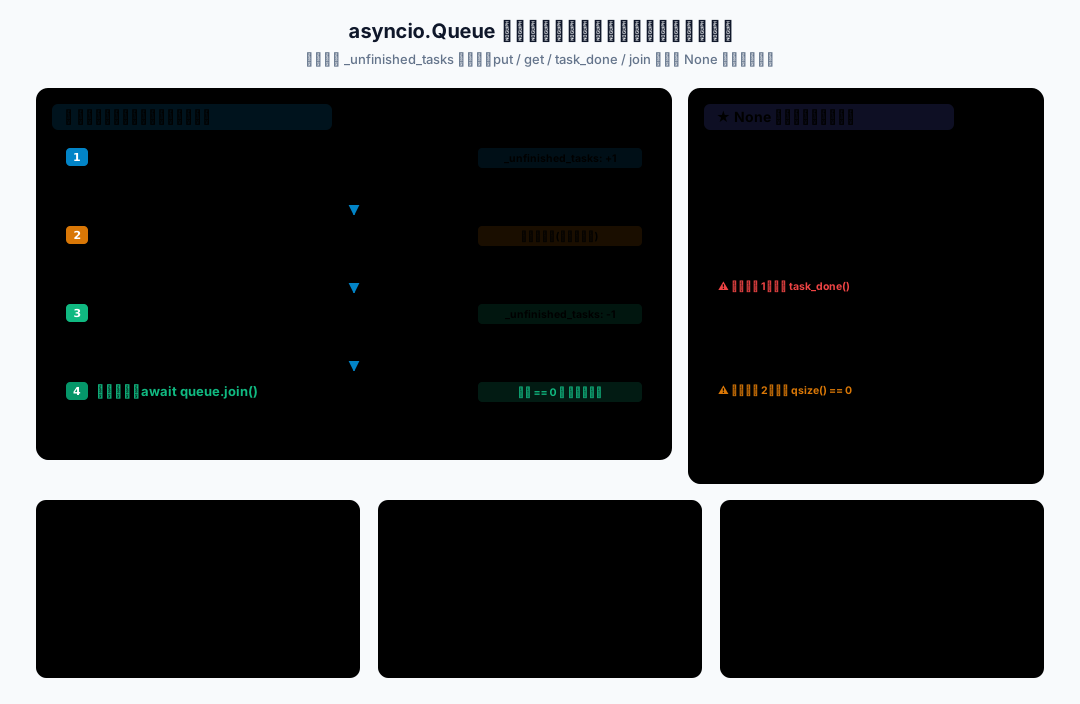
2. maxsize 与队列背压
容量限制与生产者等待
Queue(maxsize=3) 表示队列最多积压 3 个还没有被消费者取走的任务。
当队列满了,再执行:
await queue.put(task)生产者会等待,直到消费者取走一些任务。
这就是简单背压。
它解决的问题是:避免请求高峰时任务无限进入内存。
放在接口中时,这段等待发生在响应返回前。因此“后台执行”表示任务处理交给 worker,并不保证入队永远不增加接口耗时。
注意:maxsize 不是生产级限流,也不是可靠消息机制。它只能控制当前进程里这个队列的积压数量。
需求:生产者放任务很快,消费者处理任务比较慢。如果队列没有容量限制,任务可能越积越多。
功能分析:
- 使用
asyncio.Queue(maxsize=3)限制队列最多积压 3 个任务。 - 生产者连续放入 7 个任务。
- 消费者慢慢处理任务。
- 打印
queue.qsize()观察队列长度。 - worker 捕获普通异常,避免一个任务失败导致消费者退出。
代码还记录每次 put() 的等待时间。前几个任务通常立即入队;队列填满后,后续入队可能等待约 0.5 秒,直到消费者取走下一项。结合“当前队列长度”与“入队等待”两列,才能看出生产者确实被背压减速。任务 3 失败后,任务 4~7 仍应继续处理。
文件名:02_queue_worker.py
import asyncio
import time


async def handle_task(task: dict):
    await asyncio.sleep(0.5)

    if task["student_id"] == 3:
        raise ValueError("模拟任务处理失败")

    print("任务处理完成", task)


async def producer(queue: asyncio.Queue):
    for student_id in range(1, 8):
        task = {"type": "update_stat", "student_id": student_id}
        start_time = time.perf_counter()
        await queue.put(task)
        waited = time.perf_counter() - start_time
        print("放入任务", task, "当前队列长度", queue.qsize(),
              f"入队等待 {waited:.2f} 秒")

    await queue.put(None)


async def worker(queue: asyncio.Queue):
    while True:
        task = await queue.get()

        try:
            if task is None:
                print("worker 退出")
                return

            await handle_task(task)
        except Exception as exc:
            print("任务处理失败", task, exc)
        finally:
            queue.task_done()


async def main():
    queue = asyncio.Queue(maxsize=3)
    worker_task = asyncio.create_task(worker(queue))

    await producer(queue)
    await queue.join()
    await worker_task


if __name__ == "__main__":
asyncio.run(main())运行命令:
uv run python c09_async_queue_producer_consumer/02_queue_worker.py运行结果说明:
- 生产者会尽量快速放任务。
- 队列最多积压 3 个未被取走的任务。
- 当队列满了,
await queue.put(task)会等待。 student_id == 3会模拟一次任务失败。- worker 捕获异常后继续处理后面的任务。
注意:maxsize=3 只是演示。真实项目里要根据任务耗时、内存、请求峰值和服务能力设置。
这段代码不是生产级限流方案,只是让我们看到:队列也需要容量边界,不能无限堆积。
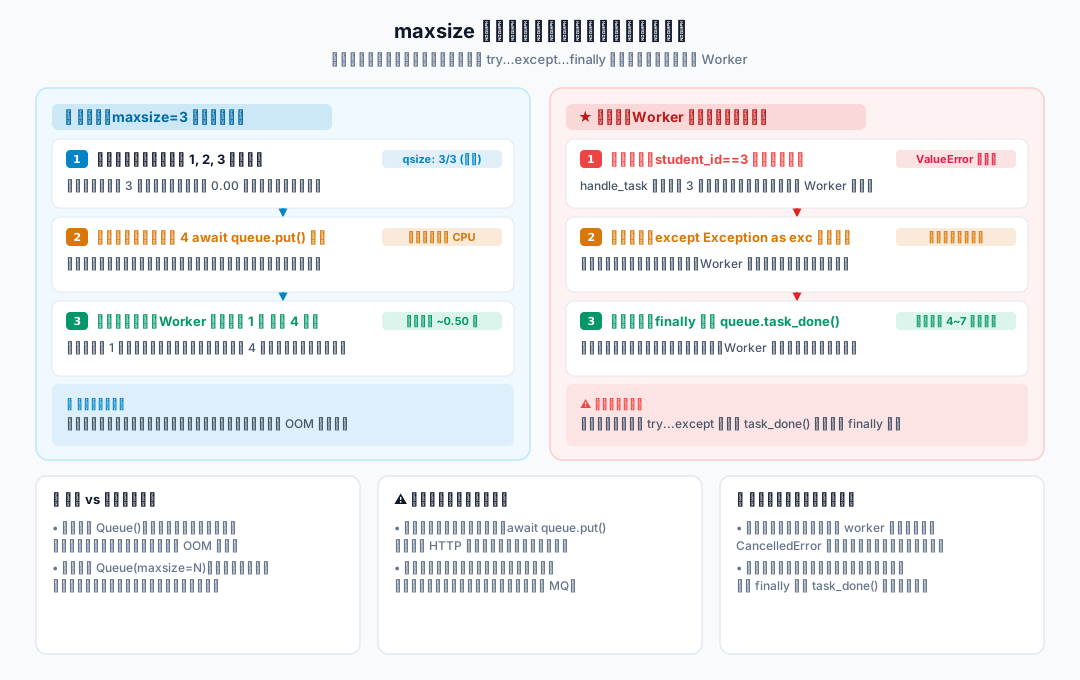
3. FastAPI 后台 worker 的生命周期
后台 worker 的异常处理
worker 处理任务时,某一个任务可能失败。
如果不捕获异常,worker 可能直接退出,后面的任务就没人处理。
所以 worker 里通常要做基础异常处理:
try:
    await handle_task(task)
except Exception as exc:
    print("任务处理失败", exc)
finally:
queue.task_done()注意:这里捕获的是普通任务处理异常。复杂重试、死信队列、告警系统,不在本章展开。
需求:把队列放进 FastAPI 应用里。接口只负责把任务放进队列,后台 worker 负责慢慢处理。
功能分析:
- 在
lifespan中创建asyncio.Queue(maxsize=100)。 - 在
lifespan中启动后台 worker。 - 用
app.state.task_queue保存队列。 - 用
app.state.worker_task保存 worker 任务引用。 - 服务关闭时放入退出信号,等待队列处理完,再等待 worker 退出。
文件名:03_fastapi_queue_lifespan.py
import asyncio
from contextlib import asynccontextmanager

from fastapi import FastAPI

processed_tasks = []


async def worker(queue: asyncio.Queue):
    while True:
        task = await queue.get()

        try:
            if task is None:
                print("后台消费者退出")
                return

            await asyncio.sleep(0.2)
            processed_tasks.append(task)
        except Exception as exc:
            print("后台任务失败", exc)
        finally:
            queue.task_done()


async def stop_worker(queue, worker_task, timeout=5.0):
    try:
        async with asyncio.timeout(timeout):
            if worker_task.done():
                await worker_task
                if not queue.empty():
                    print("worker 已退出,剩余待取任务不再处理")
                return
            await queue.put(None)
            await queue.join()
            await worker_task
    except TimeoutError:
        print("后台任务关闭等待超时,取消 worker;剩余任务可能丢失")
    finally:
        if not worker_task.done():
            worker_task.cancel()
        # 回收任务;取消不会转换成业务处理成功。
        await asyncio.gather(worker_task, return_exceptions=True)


@asynccontextmanager
async def lifespan(app: FastAPI):
    queue = asyncio.Queue(maxsize=100)
    worker_task = asyncio.create_task(worker(queue))

    app.state.task_queue = queue
    app.state.worker_task = worker_task

    try:
        yield
    finally:
        await stop_worker(queue, worker_task)


app = FastAPI(lifespan=lifespan)


@app.get("/enqueue/{student_id}")
async def enqueue_task(student_id: int):
    task = {"type": "access_log", "student_id": student_id}
    await app.state.task_queue.put(task)
    return {"ok": True, "queued": task}


@app.get("/debug/tasks")
async def debug_tasks():
return {"processed_tasks": processed_tasks}安装依赖:
uv sync启动命令:
uv run python -m uvicorn 03_fastapi_queue_lifespan:app --reload --app-dir c09_async_queue_producer_consumer访问地址:
http://127.0.0.1:8000/enqueue/1
http://127.0.0.1:8000/enqueue/2
http://127.0.0.1:8000/debug/tasks运行逻辑:
- FastAPI 启动时进入
lifespan。 lifespan创建队列,并启动 worker。- 请求
/enqueue/{student_id}时,接口把任务放进队列。 - 接口不等待任务处理完成,直接返回。
- worker 在后台取任务并追加到
processed_tasks。 - 服务关闭时,
lifespan放入None退出信号。 queue.join()等待已入队任务处理完。await worker_task等待 worker 真正退出。
完整代码在 finally 中调用 stop_worker(),生命周期上下文异常退出时也进入关闭流程。关闭阶段先停止生产,再发送退出信号;put(None)、join() 和等待 worker 共用 5 秒等待预算。超过预算则取消并回收 worker,剩余任务可能丢失。若 worker 已退出,直接等待它并报告剩余待取任务,不再对无人消费的队列无限等待。普通任务异常由 worker 捕获,CancelledError 则继续传播。
这里演示的是正常关闭时的流程:停止接收新请求后,放入退出信号并等待已有任务处理结束。进程被强制终止时,内存中尚未处理的任务仍可能丢失;queue.join() 也不能把内存队列变成可靠消息系统。
注意:processed_tasks 只是为了教学观察。真实项目里可以把处理记录写入日志、数据库、Redis 或其他系统。
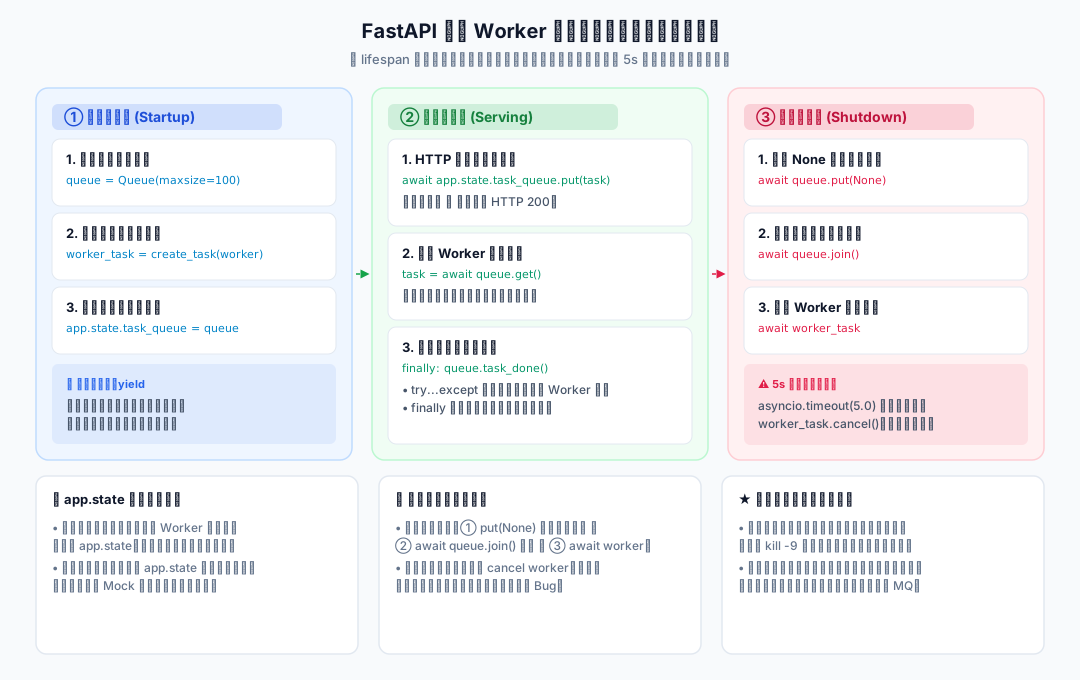
4. 学生聚合接口的后台任务队列
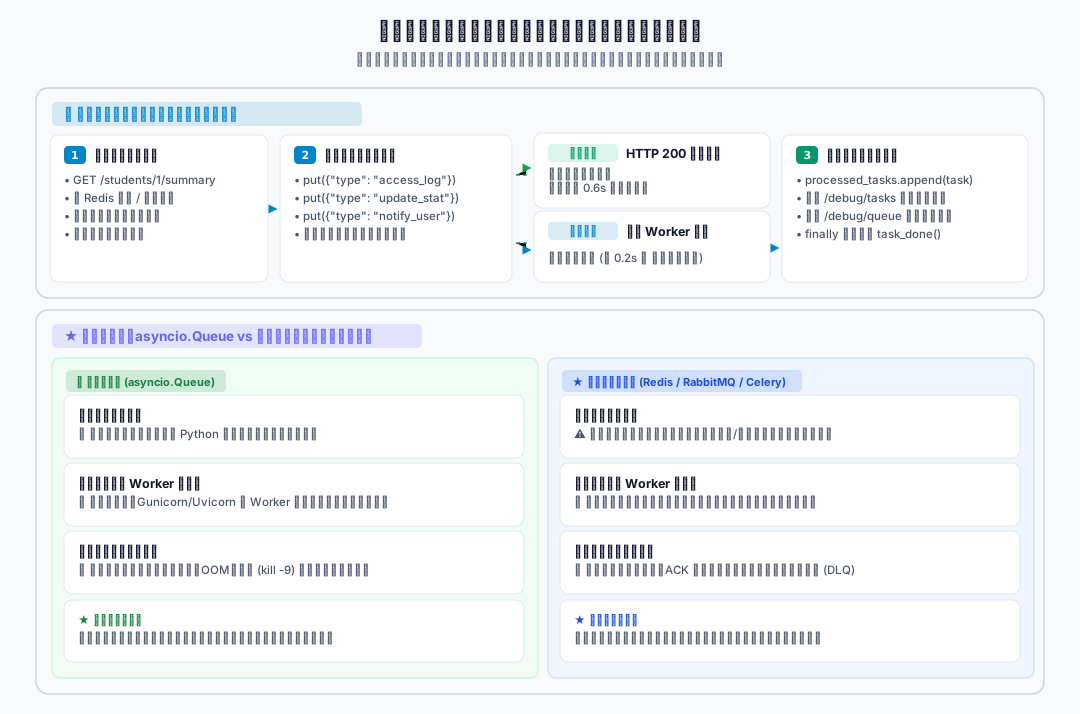
这一节把第 8 章已有的学生聚合接口继续改造。
本章新增能力:
- 成功查询学生聚合信息后,接口把访问日志、统计、通知任务放进队列。
- 入队完成后,接口返回学生信息。
- 后台 worker 异步处理这些任务。
- 可以通过调试接口查看已处理任务和当前队列长度。
完整流程:

项目结构:
_code_async/c09_async_queue_producer_consumer/
├── 01_queue_basic.py
├── 02_queue_worker.py
├── 03_fastapi_queue_lifespan.py
└── 04_fastapi_background_queue/
    ├── main.py
└── student_api_server.py安装命令:
uv sync文件名:_code_async/c09_async_queue_producer_consumer/04_fastapi_background_queue/main.py
import asyncio
from contextlib import AsyncExitStack, asynccontextmanager
from datetime import datetime

import httpx
from fastapi import FastAPI

BASE_URL = "http://127.0.0.1:8001"

student_status_data = {
    1: {"status": "active", "remark": "正常在读"},
    2: {"status": "active", "remark": "正常在读"},
    3: {"status": "frozen", "remark": "账号冻结"},
}

processed_tasks = []


class FakeConnection:
    async def fetch_student_status(self, student_id: int):
        await asyncio.sleep(0.1)
        return student_status_data.get(student_id)


class FakeAsyncDBPool:
    def __init__(self, pool_size: int = 2):
        self._semaphore = asyncio.Semaphore(pool_size)

    @asynccontextmanager
    async def acquire(self):
        await self._semaphore.acquire()
        try:
            yield FakeConnection()
        finally:
            self._semaphore.release()

    async def close(self):
        print("关闭模拟数据库连接池")


class FakeAsyncRedis:
    def __init__(self):
        self._data = {}

    async def get(self, key: str):
        await asyncio.sleep(0.03)
        return self._data.get(key)

    async def set(self, key: str, value, expire: int | None = None):
        await asyncio.sleep(0.03)
        self._data[key] = value

    async def aclose(self):
        print("关闭模拟 Redis 客户端")


class IncompleteStudentData(Exception):
    """基础信息存在,但课程或积分信息缺失。"""


async def fetch_json(
    client: httpx.AsyncClient, url: str, semaphore: asyncio.Semaphore
):
    async with semaphore:
        response = await client.get(url)

    if response.status_code == 404:
        return None

    response.raise_for_status()
    return response.json()


async def fetch_student_profile(
    client: httpx.AsyncClient, student_id: int, semaphore: asyncio.Semaphore
):
    return await fetch_json(client, f"/students/{student_id}/profile", semaphore)


async def fetch_student_courses(
    client: httpx.AsyncClient, student_id: int, semaphore: asyncio.Semaphore
):
    return await fetch_json(client, f"/students/{student_id}/courses", semaphore)


async def fetch_student_points(
    client: httpx.AsyncClient, student_id: int, semaphore: asyncio.Semaphore
):
    return await fetch_json(client, f"/students/{student_id}/points", semaphore)


async def fetch_student_summary_from_http(
    client: httpx.AsyncClient, student_id: int, semaphore: asyncio.Semaphore
):
    results = await asyncio.gather(
        fetch_student_profile(client, student_id, semaphore),
        fetch_student_courses(client, student_id, semaphore),
        fetch_student_points(client, student_id, semaphore),
        return_exceptions=True,
    )
    for result in results:
        if isinstance(result, BaseException):
            raise result
    profile, courses, points = results

    if profile is None:
        return None

    missing = []
    if courses is None:
        missing.append("课程")
    if points is None:
        missing.append("积分")
    if missing:
        raise IncompleteStudentData(f"{'、'.join(missing)}接口返回 404")

    return {
        "profile": profile,
        "courses": courses,
        "points": points,
    }


async def load_student_status_from_db(db_pool: FakeAsyncDBPool, student_id: int):
    async with db_pool.acquire() as conn:
        return await conn.fetch_student_status(student_id)


async def get_student_summary_with_cache(
    client: httpx.AsyncClient,
    db_pool: FakeAsyncDBPool,
    redis: FakeAsyncRedis,
    semaphore: asyncio.Semaphore,
    student_id: int,
):
    cache_key = f"student:{student_id}:summary"
    cached = await redis.get(cache_key)

    if cached is not None:
        return {
            "student_id": student_id,
            "ok": True,
            "reason": "success",
            "source": "cache",
            "data": cached,
        }

    status = await load_student_status_from_db(db_pool, student_id)
    if status is None:
        return {
            "student_id": student_id,
            "ok": False,
            "reason": "not_found",
            "source": "db",
            "data": None,
        }

    summary = await fetch_student_summary_from_http(client, student_id, semaphore)

    if summary is None:
        return {
            "student_id": student_id,
            "ok": False,
            "reason": "not_found",
            "source": "db+http",
            "data": None,
        }

    data = {
        "status": status,
        "external": summary,
    }

    await redis.set(cache_key, data, expire=60)

    return {
        "student_id": student_id,
        "ok": True,
        "reason": "success",
        "source": "db+http",
        "data": data,
    }


async def handle_background_task(task: dict):
    await asyncio.sleep(0.2)

    task_type = task.get("type")

    if task_type == "access_log":
        message = f"记录访问日志:student_id={task['student_id']}"
    elif task_type == "update_stat":
        message = f"更新访问统计:student_id={task['student_id']}"
    elif task_type == "send_notice":
        message = f"发送模拟通知:student_id={task['student_id']}"
    else:
        message = f"未知任务类型:{task}"

    processed_tasks.append({
        "task": task,
        "message": message,
        "handled_at": datetime.now().isoformat(timespec="seconds"),
    })


async def background_worker(queue: asyncio.Queue):
    while True:
        task = await queue.get()

        try:
            if task is None:
                print("后台 worker 收到退出信号")
                return

            await handle_background_task(task)
        except Exception as exc:
            processed_tasks.append({
                "task": task,
                "message": f"后台任务失败:{exc}",
                "handled_at": datetime.now().isoformat(timespec="seconds"),
            })
        finally:
            queue.task_done()


async def enqueue_access_tasks(queue: asyncio.Queue, student_id: int, path: str):
    created_at = datetime.now().isoformat(timespec="seconds")

    tasks = [
        {
            "type": "access_log",
            "student_id": student_id,
            "path": path,
            "created_at": created_at,
        },
        {
            "type": "update_stat",
            "student_id": student_id,
            "created_at": created_at,
        },
        {
            "type": "send_notice",
            "student_id": student_id,
            "created_at": created_at,
        },
    ]

    for task in tasks:
        await queue.put(task)


async def stop_worker(queue, worker_task, timeout=5.0):
    try:
        async with asyncio.timeout(timeout):
            if worker_task.done():
                await worker_task
                if not queue.empty():
                    print("worker 已退出,剩余待取任务不再处理")
                return
            await queue.put(None)
            await queue.join()
            await worker_task
    except TimeoutError:
        print("后台任务关闭等待超时,取消 worker;剩余任务可能丢失")
    finally:
        if not worker_task.done():
            worker_task.cancel()
        # 回收任务;取消不会转换成业务处理成功。
        await asyncio.gather(worker_task, return_exceptions=True)


@asynccontextmanager
async def lifespan(app: FastAPI):
    async with AsyncExitStack() as stack:
        app.state.client = await stack.enter_async_context(
            httpx.AsyncClient(base_url=BASE_URL, timeout=3.0, trust_env=False)
        )
        app.state.db_pool = FakeAsyncDBPool(pool_size=2)
        stack.push_async_callback(app.state.db_pool.close)
        app.state.redis = FakeAsyncRedis()
        stack.push_async_callback(app.state.redis.aclose)
        app.state.semaphore = asyncio.Semaphore(5)
        app.state.task_queue = asyncio.Queue(maxsize=100)
        app.state.worker_task = asyncio.create_task(
            background_worker(app.state.task_queue)
        )
        # 后登记的关闭操作先执行:先结束 worker,再释放共享客户端。
        stack.push_async_callback(
            stop_worker, app.state.task_queue, app.state.worker_task
        )
        yield


app = FastAPI(lifespan=lifespan)


@app.get("/health")
async def health():
    return {"status": "ok"}


@app.get("/students/{student_id}/summary")
async def get_student_summary(student_id: int):
    try:
        result = await get_student_summary_with_cache(
            app.state.client,
            app.state.db_pool,
            app.state.redis,
            app.state.semaphore,
            student_id,
        )
    except asyncio.CancelledError:
        raise
    except IncompleteStudentData as exc:
        return {
            "student_id": student_id,
            "ok": False,
            "reason": "incomplete_data",
            "data": None,
            "message": str(exc),
        }
    except httpx.TimeoutException as exc:
        return {
            "student_id": student_id,
            "ok": False,
            "reason": "timeout",
            "data": None,
            "message": str(exc),
        }
    except httpx.HTTPError as exc:
        return {
            "student_id": student_id,
            "ok": False,
            "reason": "http_error",
            "data": None,
            "message": str(exc),
        }

    if result["ok"]:
        await enqueue_access_tasks(
            app.state.task_queue,
            student_id,
            f"/students/{student_id}/summary",
        )

    return result


@app.get("/debug/tasks")
async def debug_tasks():
    return {"processed_tasks": processed_tasks}


@app.get("/debug/queue")
async def debug_queue():
return {"queue_size": app.state.task_queue.qsize()}配套的学生接口也要保存到同一个案例目录:
import asyncio

from fastapi import FastAPI, HTTPException

app = FastAPI()

student_profiles = {
    1: {"id": 1, "name": "张三", "age": 18},
    2: {"id": 2, "name": "李四", "age": 19},
    3: {"id": 3, "name": "王五", "age": 20},
}

student_courses = {
    1: ["Python", "Web"],
    2: ["Python", "AsyncIO"],
    3: ["Database", "Redis"],
}

student_points = {
    1: 95,
    2: 88,
    3: 76,
}


def ensure_student_exists(student_id: int):
    if student_id not in student_profiles:
        raise HTTPException(status_code=404, detail="student not found")


@app.get("/students/{student_id}/profile")
async def get_student_profile(student_id: int):
    ensure_student_exists(student_id)
    return student_profiles[student_id]


@app.get("/students/{student_id}/courses")
async def get_student_courses(student_id: int):
    ensure_student_exists(student_id)
    return {"courses": student_courses.get(student_id, [])}


@app.get("/students/{student_id}/points")
async def get_student_points(student_id: int):
    ensure_student_exists(student_id)

    if student_id == 3:
        await asyncio.sleep(2)

return {"points": student_points.get(student_id, 0)}启动命令需要两个终端,均从本地 _code_async 目录开始。先停止前面的演示服务,释放 8000 和 8001 端口;先启动学生服务,再访问聚合接口。本章按单工作进程验收。
终端 A,启动学生服务:
uv run python -m uvicorn student_api_server:app --port 8001 --app-dir c09_async_queue_producer_consumer/04_fastapi_background_queue终端 B,启动聚合服务:
uv run python -m uvicorn main:app --port 8000 --app-dir c09_async_queue_producer_consumer/04_fastapi_background_queue访问地址:
http://127.0.0.1:8000/health
http://127.0.0.1:8000/students/1/summary
http://127.0.0.1:8000/debug/tasks
http://127.0.0.1:8000/debug/queue运行结果说明:
/health用来确认服务启动。- 第一次访问
/students/1/summary时,结果通常来自db+http。 - 再次访问
/students/1/summary时,结果通常来自cache。 - 接口先把访问日志、统计、通知任务放进队列,再返回学生信息。
- 后台 worker 会从队列里取出任务,并把处理结果写入
processed_tasks。 - 访问
/debug/tasks可以看到后台任务处理记录。 - 访问
/debug/queue可以看到当前队列长度。
验收时先访问 /students/1/summary,确认返回成功;稍等后台 worker 处理后再访问 /debug/tasks,应看到该次请求对应的访问日志、统计和通知三条记录。/debug/queue 的 queue_size 是查看瞬间的待取任务数,可能已经是 0。失败查询不会按当前代码入队。
本章沿用第 8 章的 data.status 与 data.external 结构;基础信息存在但课程或积分返回 404 时,返回 incomplete_data,不写缓存也不入队。数据库查不到时提前返回 not_found, source="db",不请求外部服务。空课程列表是正常结果。首次完整查询返回 source="db+http",随后缓存命中返回 source="cache";两种成功请求都会各入队三项任务。
响应耗时与后台记录验证
在两个服务启动后执行:
curl -s -w '\n响应耗时:%{time_total} 秒\n' http://127.0.0.1:8000/students/1/summary三项任务各模拟处理 0.2 秒,一个 worker 共需约 0.6 秒;队列未满时,接口只等待查询和入队,不等待这 0.6 秒全部结束。首次响应还包含数据库与 HTTP 查询时间,不能把全部耗时归因于队列。首次响应后等待约 1 秒,访问 /debug/tasks,核对三种任务类型;再次查询同一学生并等待后,应新增三条记录。记录数量需与实验开始前比较,已有积压时应等得更久。
三个 put() 是依次执行的,不是原子操作。如果请求在后续入队等待期间被取消,前面的任务可能已经入队甚至开始处理;本章不保证三条任务同时入队,也不保证任务一定在接口响应后才开始执行。
注意:接口先把日志、统计、通知任务放进队列,再返回结果。队列满时入队会等待;任务真正的处理时间不计入当前响应。后台任务什么时候处理,取决于 worker 的处理速度和队列积压情况。
app.state.task_queue 保存应用级队列。所有请求共用这一个队列。
这里的共享范围是当前应用进程;不同工作进程各有队列和消费者,不能把一个进程的调试结果当作所有进程的结果。
app.state.semaphore 限制同时发出的 HTTP 请求数为 5。
app.state.worker_task 保存后台 worker 的任务引用。保存引用便于关闭时等待它退出,也方便排查问题。
queue.task_done() 不能忘。否则 queue.join() 会一直认为还有任务没有完成。
服务关闭时需要退出信号。如果没有退出信号,worker 会一直等待 queue.get()。
综合案例用 AsyncExitStack 登记关闭操作,按逆序先结束 worker,再关闭 Redis、数据库池和 HTTP 客户端;生命周期异常退出或某个关闭操作报错时,其余资源仍会尝试清理。关闭等待超时后的取消只表示终止处理,不表示任务成功。任务处理函数若吞掉取消或执行同步阻塞代码,就不能靠异步超时保证及时退出;本章 worker 使用可取消的异步等待。
processed_tasks 是为了观察结果而保留的列表,会持续增长。maxsize 只限制队列中待取的任务,不限制这份历史记录;长期运行的服务应另行限制记录数量或写入外部存储。
再次提醒:本章的队列是内存队列。进程重启会丢任务,多进程之间不共享队列。重要任务要考虑 Celery、Dramatiq、RQ、Redis Stream、RabbitMQ、Kafka 等方向。
本章小结
本章最核心的是 5 件事:
- 不需要立即完成的任务,可以从接口主流程中拆出来。
asyncio.Queue可以在同一个进程内传递异步任务。- 生产者用
put()放任务,消费者用get()取任务。 - 消费者处理完任务后要调用
task_done(),关闭时可以用join()等待任务处理完成。 - 后台 worker 要有异常处理和退出机制。
还要记住边界:asyncio.Queue 是内存队列,不是生产级可靠消息队列。它适合课程演示、单进程小任务和非关键后台处理。
练习
练习 1:连续两次成功访问 /students/1/summary,等待后台 worker 处理后查看 /debug/tasks,应有六条新记录;在处理期间多次查看 /debug/queue,观察瞬时队列长度。
练习 2:仅在 02_queue_worker.py 中将 maxsize=3 改为 1,运行并观察队列长度不超过 1,后续入队等待接近单次处理周期 0.5 秒;任务 3 失败后仍处理任务 4~7。恢复容量后再运行一次对比。
练习 3:仅在 01_queue_basic.py 中临时去掉 task_done(),观察 queue.join() 不再返回;确认现象后用 Ctrl+C 结束演示,恢复原代码并重新运行,检查程序能够正常退出。
练习 4:在生命周期简例中将 worker 的 asyncio.sleep(0.2) 临时改为 asyncio.sleep(10)。请求一次 /enqueue/1 后正常停止服务,观察关闭等待约 5 秒后打印超时提示,并取消 worker;恢复原值。强制杀死进程无法验证这段清理流程。
练习 5:在综合案例中将课程请求路径临时改为 /students/{student_id}/courses_missing,重启聚合服务清空缓存,再查询学生 1。应返回 incomplete_data,后台任务记录不增加。恢复路径并重启,再完成两次成功查询的六条记录验收。